


If you’ve ever watched a YouTube video and wished you could capture the exact words-maybe for notes, subtitles, research, or repurposing-you’re definitely not alone. Creators, students, marketers, and editors all need transcripts at some point, and the good news is: it’s easier now than ever. In this Inside Editors Guide, we’ll walk through how to get a transcript of a YouTube video in a simple, conversational way, making sure you understand not only how to do it, but also why certain methods work better than others. Think of this as your friendly, expert walkthrough-clear, practical, and tailored to real-world use.
Before diving in, keep in mind that YouTube transcripts aren’t only for accessibility. They’re essential for editing workflows, repurposing long videos into short-form content, and improving your overall creative process. If you’ve tried copying text manually before, you know how time-consuming it can be. This guide is here to save you that headache and help you use transcripts to work smarter, not harder. As we move through the steps, you’ll also learn how tools differ and when professional editors can help polish the final result.
Understanding Why YouTube Transcripts Matter for Creators and Professionals

Transcripts play a much bigger role in video production than most people realize. YouTube’s automatic captions give creators a surprisingly strong foundation for tasks like editing scripts, analyzing audience responses, or preparing multiple content formats from one video. When you extract the transcript, you can skim dialogue, identify topics quickly, and locate the exact sections that matter-without scrubbing through minutes of footage. If you’ve ever reviewed an hour-long tutorial or interview, you already know how valuable this can be.
What makes transcripts especially useful is how they support both speed and accuracy. For editors, having a text version of the audio accelerates the decision-making process. You can storyboard faster, write descriptions or video chapters more precisely, or even generate subtitles that feel more polished than YouTube’s raw auto-generated captions. As YouTube’s captioning technology improves every year, the transcripts become a reliable starting point for practically every workflow.
Why Transcripts Boost Accessibility and SEO
Beyond workflow efficiency, transcripts open doors to better accessibility, which is something creators can’t afford to overlook in 2026 and beyond. Millions of viewers rely on text-based alternatives to videos, whether due to hearing challenges or simply because they prefer reading over listening. Including a transcript or refined subtitles instantly enhances your video’s accessibility score, something YouTube’s algorithm increasingly values.
There’s also a strong SEO advantage. A well-structured transcript makes your video more discoverable across both YouTube and Google Search. Search engines can read text, not audio, so the transcript helps algorithmic systems understand what your video is actually about. This boosts ranking potential, especially for long-form or educational content. If you’ve ever wondered why some videos with modest production quality outrank more polished ones, it often comes down to structured text, captions, and metadata-which all begin with the transcript.
How Transcripts Set the Stage for Smarter Editing
As you learn how to get transcript of YouTube video, it’s worth considering how the text reshapes every part of your editing process. Many modern editors rely on text-based editing workflows where you cut clips by selecting words instead of trimming timelines. This approach makes editing feel natural and intuitive. Even beginners can use text-guided editing to remove filler words, correct pacing, and tighten narrative flow without getting lost in complex interfaces. The transcript becomes both a roadmap and a creative canvas.
Understanding these benefits prepares you for the next step: learning exactly how to access, copy, and optimize YouTube transcripts. Once you know the basics, you can explore advanced methods that professionals use every day.
Using YouTube’s Built-In Transcript Feature for Fast Access

YouTube has made transcript access incredibly simple, but it’s not always obvious where these options are located. When you’re watching a video on desktop, you’ll find a three-dot menu or “More actions” button beneath the video title. Clicking it reveals the Show Transcript option. This opens a sidebar with timestamps and searchable text, allowing you to scroll through the entire transcript in seconds. It’s surprisingly fast, and most users never realize how powerful this native feature is until they try it.
On mobile, the process is slightly different because the interface is more compact. You’ll typically need to tap the video’s description area, then find the Transcript button hidden under the expanded menu. Once opened, you’ll see the same content as on desktop, though the layout may differ depending on your device. Since YouTube updates its UI frequently, knowing the general location-description, three dots, or “More” section-makes it easier to adapt when layouts change.
How Accuracy Varies Between Auto-Generated and Manual Captions
Not all YouTube transcripts are created equal. Some videos include manually uploaded captions, usually added by the creator or editing teams. These tend to be more accurate and cleaner than auto-generated captions. Auto-generated transcripts can include minor errors, like misheard words or awkward punctuation. However, YouTube’s AI-driven captioning system has improved dramatically according to a 2025 Google Accessibility update, which noted over 89% accuracy across supported languages.
If you plan to use the transcript for editing, interviews, tutorials, or repurposing content into written formats like blogs or social posts, it’s a good idea to quickly skim for mistakes. A few corrections go a long way. And if you want a flawless transcription, professional editing or third-party tools can refine the text with proper punctuation, grammar, and speaker labels-something YouTube’s automatic system still doesn’t fully master.
Copying, Exporting, and Organizing the Transcript
Once you’ve opened the transcript, copying it is simple. You can click the three dots inside the transcript panel and turn timestamps on or off depending on your needs. Disabling timestamps gives you a cleaner block of text, while keeping them helps if you’re planning to edit according to specific moments in the video. Highlight the text, copy it, and paste it into a notes app, Word document, or editing software.
If you want to organize the text further, try segmenting your transcript into scenes or topic clusters. This helps if you’re preparing clips for platforms like Instagram, TikTok, or Pinterest-or if you’re planning long-form edits for travel, reaction, or product videos. For businesses producing polished content, Inside Editors’ video editing services often take transcripts and convert them into full storyboards, captions, or chapter markers, saving creators hours of work.
The native transcript tool is fast, but as you’ll see next, there are more advanced methods that professional creators rely on for accuracy, structure, and workflow automation.
Using AI and Third-Party Tools to Extract High-Quality Transcripts

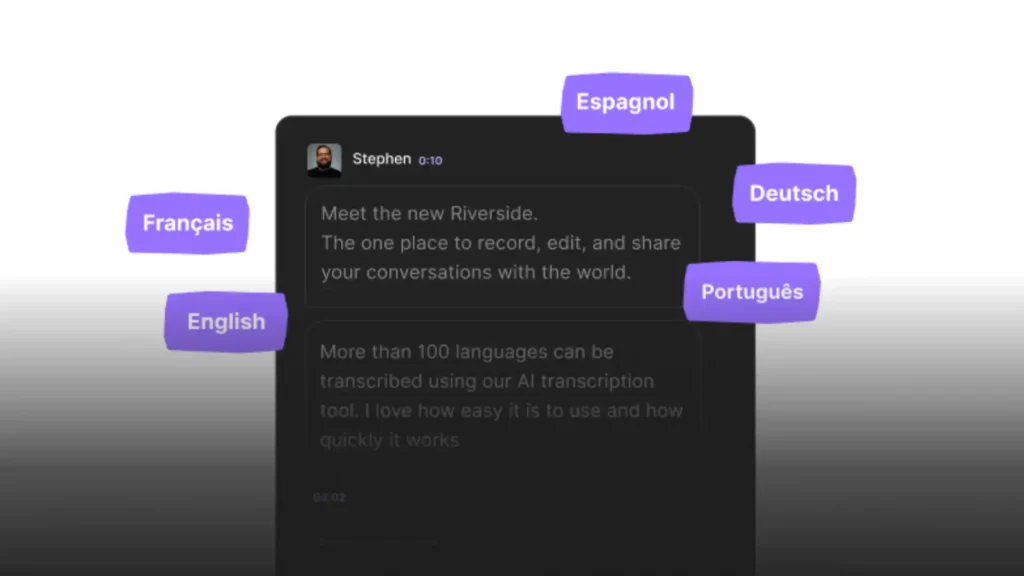
While YouTube’s built-in transcript option works well for basic needs, it’s not always enough for creators and professionals who need cleaner formatting, higher accuracy, and export-friendly options. This is where third-party tools shine. Platforms like VEED, Descript, Rev, Otter.ai, and Kapwing offer robust transcription features that understand context, differentiate speakers, and handle noise more effectively. These tools often produce cleaner transcripts than YouTube’s automated captions, especially for videos with multiple speakers or background noise.
Another major advantage is automation. Many AI tools provide direct YouTube URL imports, meaning you don’t have to upload video files manually. They detect the audio, process it, and deliver a transcript that’s ready for editing or exporting. This level of convenience saves significant time, particularly for creators producing frequent content or managing large client batches.
Comparing Tools: Accuracy, Pricing, and Ease of Use
To help you decide which tool might be right for you, here’s a quick comparison of popular transcription options:
| Tool | Accuracy Level | Best For | Export Options | Price Range |
| YouTube Built-In | Good (80–90%) | Quick tasks | Copy/Paste | Free |
| Descript | Excellent (90–95%) | Text-based editing | DOCX, TXT, SRT | Free + Paid |
| Rev | Human-level (99%) | Professional projects | DOCX, TXT, SRT | Paid per minute |
| Otter.ai | Very good (85–95%) | Meetings, interviews | TXT, DOCX | Free + Paid |
| VEED/Kapwing | Good to very good | Social content | SRT, TXT | Free + Paid |
Each tool has its strengths. For example, Descript is ideal for creators who want to edit video by editing text, while Rev is the top choice when accuracy is critical. Otter.ai excels at meetings, interviews, and multi-speaker discussions. VEED and Kapwing offer a great balance for social creators who need subtitles and quick exports.
The best choice depends on your workflow and goals. If you’re a content creator producing weekly videos, Descript’s automation might fit perfectly. If you’re preparing content for a business or campaign, Rev’s human transcription ensures quality. These tools can also pair wonderfully with Inside Editors’ advanced editing services, especially when combining polished transcripts with premium video production.
How AI Tools Enhance Creative and Editing Workflows
AI-powered transcription tools do more than convert speech to text-they enhance your overall creative process. For instance, Descript allows creators to delete filler words or awkward pauses directly from the transcript. This automatically updates the video timeline, leading to faster edits and smoother dialogue. Otter.ai highlights keywords, summarizes sections, and identifies speakers, reducing time spent on manual organization.
Using AI tools also makes it easier to repurpose content. If you’re turning a YouTube video into a blog post, script, tutorial, or social captions, having a clean, structured transcript saves hours of rewriting. Inside Editors often uses transcripts provided by clients to build cohesive edits that reflect the original message while boosting clarity and engagement.
As AI technology continues evolving in 2026, expect transcription tools to become even smarter. Some are already experimenting with real-time translation, context-sensitive editing, and data extraction-all of which will shape how creators and brands produce content.
Extracting Transcripts on Mobile Devices for On-the-Go Productivity
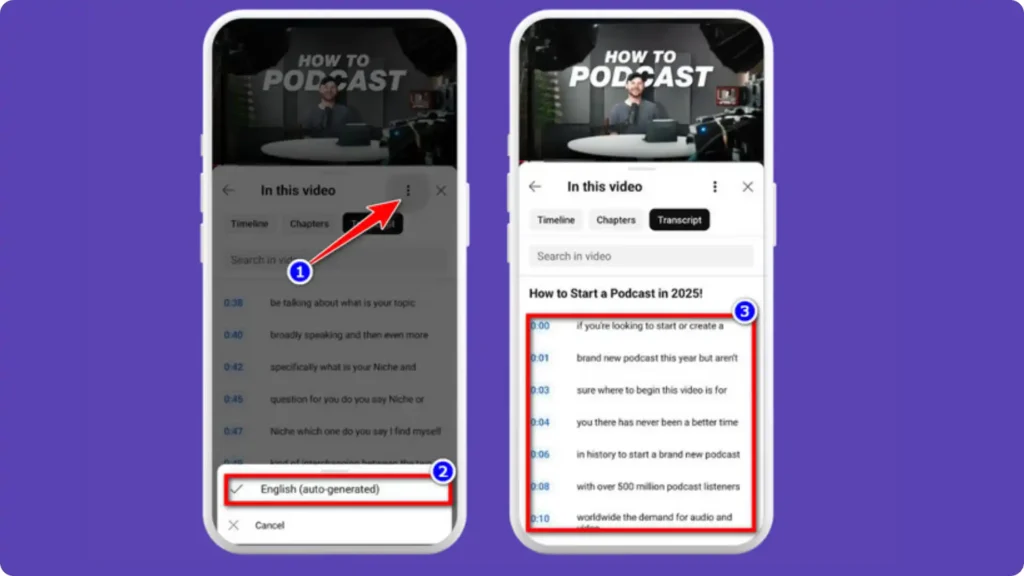
If you’re often on the move and prefer using your phone to extract transcripts, YouTube’s mobile interface gives you surprisingly powerful options. The transcript feature on mobile works similarly to the desktop version, though it’s tucked into different menu sections. When watching a video on iPhone or Android, tap the arrow that expands the video description. In most cases, you’ll see a Transcript button below the description or inside the “More options” panel. Once opened, the transcript displays in a clean vertical list, complete with timestamps.
This mobile-first layout is especially helpful if you’re reviewing content while commuting or taking quick notes during a meeting. Many creators use this workflow to jot down important phrases, quotes, or sections they want to turn into short-form content later. Even if you’re not planning a full script, having access to the transcript on your phone keeps your ideas organized and easy to revisit.
Why Mobile Transcription Helps Creators Stay Consistent
For many content creators-especially vloggers, educators, travel editors, or fitness coaches-time is tight. You can’t always wait to sit at your desk, open your laptop, and extract everything in a controlled workflow. Being able to view, copy, and process transcripts directly from your phone keeps your creative momentum intact. It also helps with quick SEO tasks, such as creating video titles, captions, or chapter markers while the message is still fresh in your mind.
If you’re posting across multiple platforms, mobile transcription becomes even more valuable. For example, imagine recording a travel vlog and wanting to turn one section into a short inspirational quote for Instagram. With the transcript open on your phone, you can grab the sentence instantly without replaying clips repeatedly. This kind of efficiency is what helps creators stay consistent without burning out.
Using Mobile Apps for Cleaner, More Accurate Transcripts
Beyond YouTube’s built-in feature, there are mobile apps designed specifically for on-the-go transcription. Otter.ai, for example, offers an app for both iPhone and Android that can import YouTube links or convert audio on the spot. Clip-based creators often use apps like VEED or CapCut to combine transcription with instant subtitle creation, making the editing process smoother.
These mobile tools not only provide more accurate transcripts but also include editing features that YouTube itself lacks. You can fix punctuation, break text into subtitle-friendly lines, or export everything into SRT files that sync perfectly with desktop editing software. If you’re a creator who moves between mobile and desktop workflows, this hybrid approach offers the best of both worlds-speed plus accuracy.
As you master these mobile tools, you’ll start to see how much easier content repurposing becomes. And if you ever need help transforming transcripts into full professional edits, Inside Editors’ team can step in and streamline the entire process for you.
Ensuring Transcript Accuracy for Professional or Client Projects
Even though tools have become impressively accurate, they’re not flawless. Auto-generated transcripts often struggle with background noise, uncommon names, overlapping speech, and fast talkers. You might see small issues like missing punctuation, misheard words, or awkward phrasing. While these errors don’t matter much for personal use, they become a problem when delivering professional-quality content to clients, brands, or agencies.
A quick way to fix these errors is to skim the transcript and compare it to sections of the video that contain unfamiliar words or important details. Tools like Descript and Rev automatically highlight uncertain passages, which makes correction faster. If you’re working with interviews, quoting experts, or producing educational content, taking just five minutes to clean up the transcript can dramatically improve clarity. This level of precision is what separates casual edits from professional work.
How Human Editing Improves Quality Beyond Automation
AI tools give you speed, but nothing beats human-level precision when accuracy truly matters. Professional editors or transcriptionists understand context better than software. They can distinguish between speakers, capture tone, correct technical terms, and add meaningful punctuation that enhances readability. If you’re preparing transcripts for corporate presentations, training videos, documentaries, or high-stakes projects, investing in human editing can save you from misunderstandings later.
At Inside Editors, many clients send us transcripts taken directly from YouTube or AI tools. Our editors clean them, restructure them, and convert them into polished scripts or captions. That’s because software may get the words right, but it often misses the nuance that makes content feel human. When clarity and professionalism matter, combining AI speed with human review gives the best outcome.
Tools for Enhancing Accuracy with Minimal Effort
If you’re looking to fix transcripts quickly without doing all the work manually, a few tools can help bridge the gap. Grammarly or LanguageTool can correct grammar and punctuation within minutes, especially after you paste the text into a document. Apps like Descript allow you to automatically remove filler words such as “uh,” “um,” and “you know,” helping streamline your script.
If you’re planning to repurpose your transcript into multiple content formats-such as blog posts, short videos, or even product videos-these refinements become incredibly valuable. They save time in the editing room and ensure your final product is polished and ready for any platform. And if your project demands a flawless end result, professional editors can add the final layer of refinement.
Repurposing and Optimizing Your Transcripts for SEO
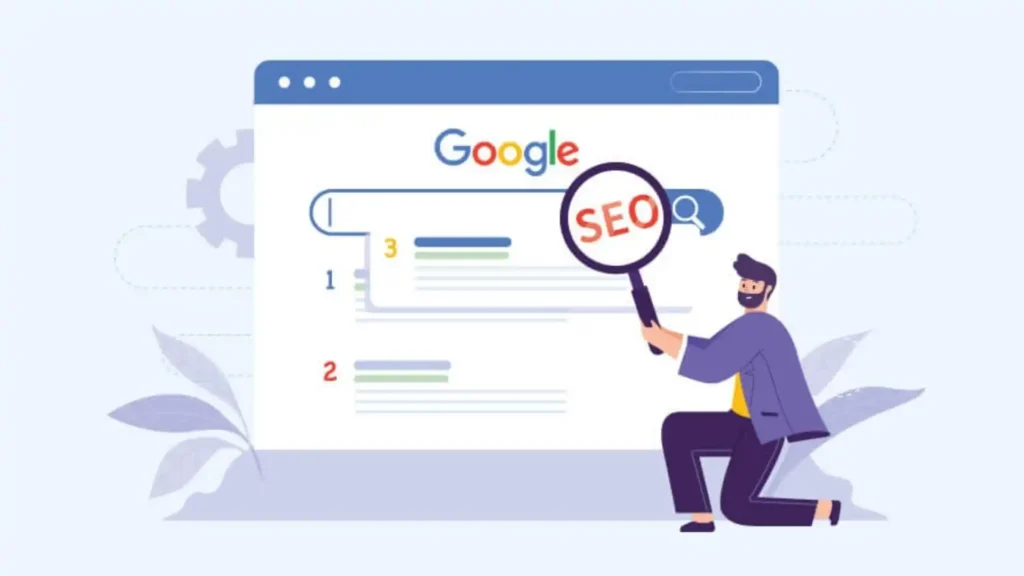
YouTube is the world’s second-largest search engine, and transcripts play a huge role in how videos are indexed and ranked. Search algorithms understand text better than sound, so your transcript acts like a bridge between your video and the keywords your audience is searching for. When YouTube recognizes relevant phrases in your transcript, your video becomes more likely to appear in recommendations or search results.
For creators focusing on long-term growth, optimizing your transcript can boost visibility significantly. You can revise your transcript slightly to emphasize key phrases, add clarity, or refine the overall structure, making it easier for search engines to understand your content. If you’re posting tutorials, product reviews, or educational videos, this is especially valuable. A refined transcript helps search engines connect your content with real viewer intent.
Turning Transcripts Into Blogs, Social Posts, and Scripts
One of the biggest advantages of extracting transcripts is that it makes repurposing effortless. A single YouTube video can become multiple content pieces across your social platforms. For example, a transcript from a reaction video can be turned into a short-form narrative highlight for TikTok, while a travel vlog transcript can be used to create a full blog post or a Pinterest description.
If you’re a brand or influencer who posts regularly, this strategy saves you hours of writing from scratch. You can even convert transcripts into scripts for future videos, giving your content a more consistent voice. This is a strategy we often use at Inside Editors when working with creators who need cross-platform consistency. Having a text version of your video ensures your messaging stays sharp and aligned across every channel.
Embedding Transcripts on Websites for Better Google Rankings
If you run a website, blog, or portfolio, posting transcripts alongside your videos gives you a strong SEO advantage. Google indexes written text more effectively than multimedia, so embedding your transcript makes your content rank higher. Readers also appreciate having a text version-they can scan, quote, or understand your content without watching the full video.
For brands looking to drive organic traffic, this approach is incredibly powerful. It not only improves search ranking but also increases dwell time as visitors spend more time engaging with your content. If you want to take it a step further, Inside Editors can help transform raw transcripts into polished articles, guides, or case studies tailored to your brand voice.
Avoiding Common Mistakes When Extracting and Using Transcripts

One of the biggest mistakes creators make is copying YouTube’s auto-generated transcript and publishing it directly. While this saves time, it can create readability issues-missing punctuation, inconsistent casing, or odd phrasing. Readers can tell when content hasn’t been reviewed, and it reduces your professionalism. Taking a few minutes to adjust the transcript helps ensure your content reflects your quality standards.
Ignoring Copyright and Usage Rights
Transcribing videos that you don’t own can raise copyright concerns if you intend to repurpose the content for public use. While YouTube allows viewers to access transcripts, using the text outside of personal reference-such as publishing it elsewhere-may violate terms. If you’re using someone else’s transcript for educational or commentary purposes, always provide attribution and stay within fair-use boundaries.
Overlooking the Value of Professional Editing for Final Outputs
Another common oversight is assuming that transcripts are the final product. In reality, transcripts are raw foundations. Professional editing transforms that text into stories, scripts, captions, or narratives that resonate with your target audience. If you skip the refining stage, your content may feel unfinished or lack the emotional impact that keeps viewers engaged.
Putting Everything Together: Choosing the Best Transcript Method for Your Needs

At this point, you’ve explored multiple ways to learn how to get a transcript of YouTube video-from built-in tools to AI platforms, mobile apps, and professional refinements. The best method depends on how you plan to use the transcript. If you only need a quick reference for personal notes, YouTube’s native transcript feature is perfect. If accuracy matters and you want export-ready text to repurpose across multiple platforms, AI tools or human-level transcription services offer more reliability.
Your creative goals also matter. For example, if you’re producing long-form interviews or documentary-style content, accuracy is king. If you’re posting daily social content, speed and convenience take priority. Understanding your workflow helps you choose the right tool without wasting time or money.
Why Professional Editing Matters When Quality Counts
Even with great tools, the difference between a rough transcript and a polished one is noticeable. That’s where Inside Editors plays a meaningful role. Our editors take transcripts and turn them into compelling stories with structure, flow, and emotional impact-something AI still can’t replicate perfectly. Whether you’re creating reaction videos, lifestyle vlogs, product showcases, or business content, professional editing helps your videos stand out.
Many creators underestimate how much smoother their workflow becomes when editing starts from a clean, well-organized transcript. When the text is polished, the edit is smoother, the pacing is tighter, and the final product feels more refined. If you want your videos to reach a higher standard, pairing clean transcripts with expert editing is a reliable strategy.
Conclusion: Transcripts Are the Secret Ingredient to Smarter, Faster, Better Content

Learning how to get a transcript of YouTube video is more than a technical task-it’s an essential part of modern content creation. Transcripts help you edit faster, repurpose content, improve accessibility, and boost your SEO. Whether you use YouTube’s built-in feature, AI-powered tools, or human editing services, the key is to choose the method that aligns with your creative goals.
If you’re ready to turn your transcripts into polished, professional videos that stand out, Inside Editors is here to help. From travel vlogs to reaction videos to business content, our expert editors transform your raw ideas into visually compelling stories. Explore Inside Editors’ Video Editing Services
FAQs: How to Get Transcript of YouTube Video
1. Can I get a transcript of any YouTube video?
Not every YouTube video has a transcript. If the creator hasn’t enabled captions or the audio is hard to process, you might not see the “Show transcript” button at all. In those cases, you can try AI tools or online generators that create a transcript from the video URL, but they’re still limited by audio quality and any copyright restrictions on reuse.
2. How accurate are YouTube’s auto-generated transcripts?
YouTube’s automatic transcripts are surprisingly good for clear speech, but they still struggle with accents, jargon, and background noise. Think of them as a strong first draft rather than a final script. For personal notes, they’re usually enough; for client work, legal content, or polished blogs, you should proofread and correct key terms before publishing.
3. Is it legal to download or reuse a YouTube transcript?
Getting a transcript for your own learning or internal notes is usually fine, especially if you’re just copying text for personal use. Reusing large portions of someone else’s transcript publicly-like in a blog post or video script-can infringe copyright unless it’s clearly fair use (commentary, criticism, short quotes with attribution). When in doubt, use short quotes, credit the creator, or stick to content you own.
4. What should I do if there’s no “Show transcript” button?
If you don’t see “Show transcript,” first check another browser or device to rule out a temporary glitch. If it’s still missing, the video likely has no captions or the creator turned transcripts off. You can then try a trusted YouTube transcript generator by pasting the video URL, or download your own video (if you’re the owner) and run it through an AI transcription tool that accepts uploads.
5. What’s the difference between free tools and paid transcription services?
Free tools are perfect for quick research or low-stakes content-they give you a usable transcript fast, but quality and privacy policies vary. Paid AI transcription and human services focus on higher accuracy, better formatting, and stronger privacy guarantees, which matter for brands, professionals, and sensitive topics. If you’re building revenue-generating videos, a small transcription investment often pays off in workflow speed and fewer mistakes.
6. How can Inside Editors help if I don’t want to DIY?
If you’d rather focus on ideas than transcripts and timelines, Inside Editors can slot into your workflow at the editing stage. You can provide raw footage, existing captions, or rough transcripts, and a professional editor will shape them into polished content that fits your brand and platform. That way, you still benefit from transcript-driven storytelling-without spending hours fixing text or trimming clips yourself.


