

Welcome to Inside Editors, where we transform complex technical specifications into actionable insights for content creators and marketers. Understanding the optimal TikTok Video Size is the foundational step toward creating viral, high-quality content that performs exceptionally well on the platform.
If you’ve ever uploaded a video only to find it cropped awkwardly, blurry, or surrounded by black bars, you’ve encountered the frustrating reality of incorrect sizing. TikTok, unlike older video platforms, is optimized exclusively for vertical viewing, demanding specific dimensions to look professional and engaging.
In this comprehensive guide, we will break down the exact specifications for the perfect TikTok Video Size, explain why these dimensions matter, and provide a quick tutorial on how to ensure your content is always perfectly formatted.
“In the mobile-first world, the vertical screen is the new canvas. Creators who master vertical optimization inherently gain a competitive edge.” – Sarah F., Digital Content Strategist
Mastering the Dimensions: The Ideal TikTok Video Size
The success of your TikTok content hinges on filling the entire screen perfectly, creating an immersive, distraction-free viewing experience. This requires adhering to the platform’s strict aspect ratio and resolution requirements.
The Critical Aspect Ratio: 9:16
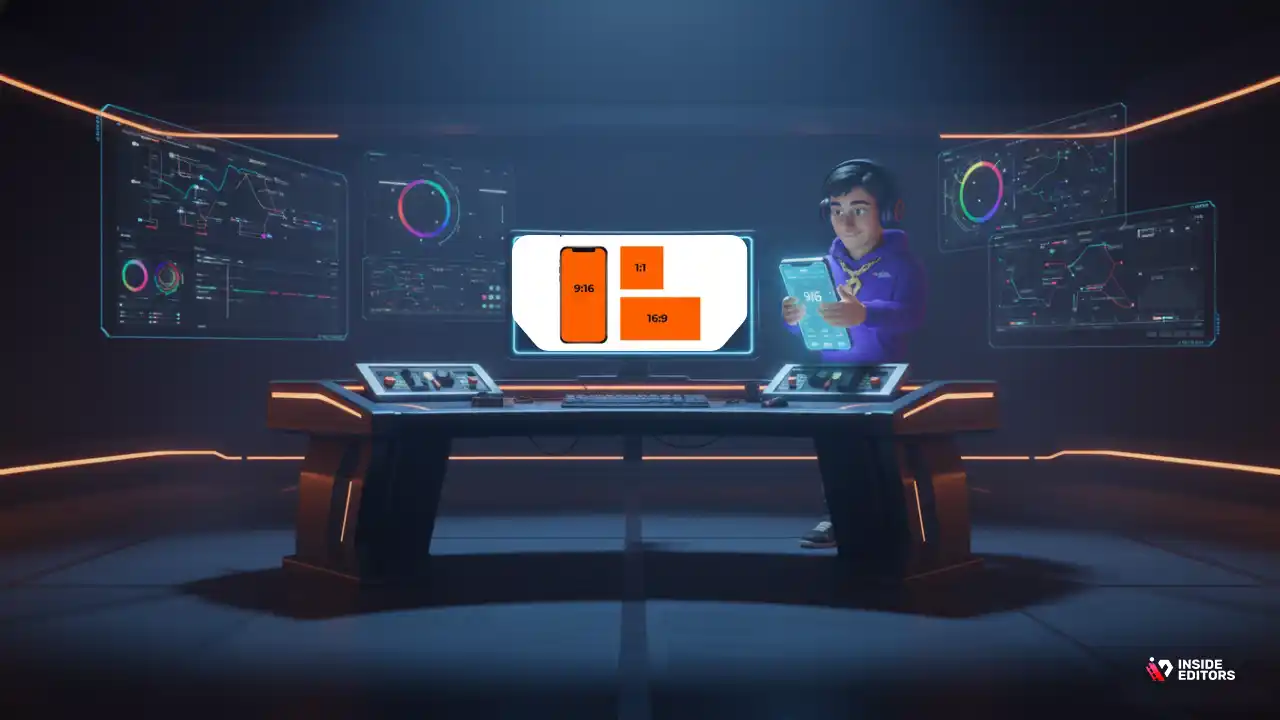
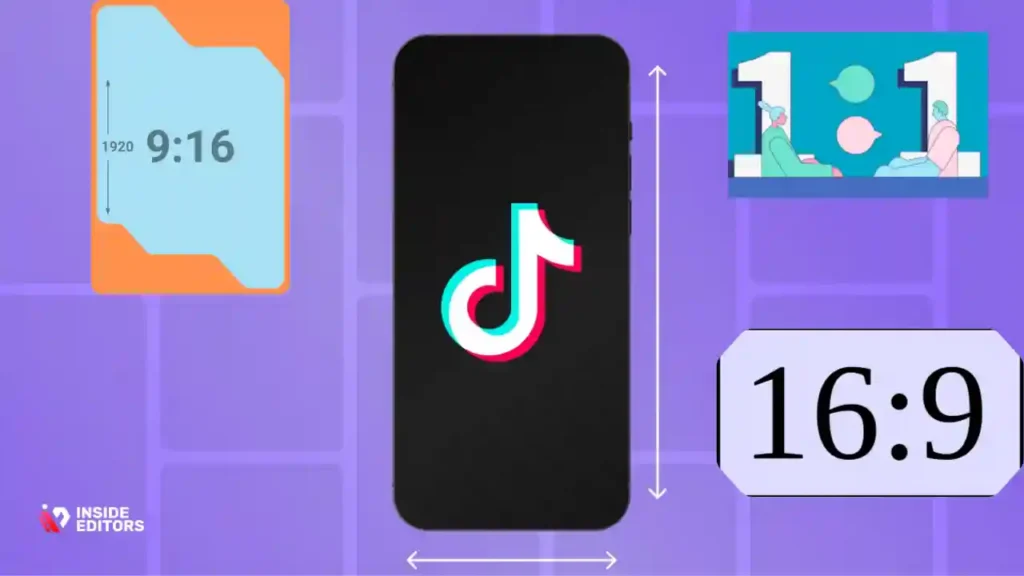
The aspect ratio describes the relationship between the width and height of a video frame. For TikTok, the standard is unequivocally 9:16. This is the native ratio of most modern smartphones when held vertically.
| Aspect Ratio | Description | Usage |
|---|---|---|
| 9:16 | Portrait Orientation (Tall) | Ideal for TikTok (Fills the entire screen) |
| 16:9 | Landscape Orientation (Wide) | Standard for YouTube/TV (Will show black bars on TikTok) |
| 1:1 | Square | Used for Instagram feeds (Not ideal for full-screen TikTok) |
Using anything other than 9:16 will result in “letterboxing” (horizontal black bars) or “pillarboxing” (vertical black bars), which immediately signals amateur production quality and reduces viewer engagement.
Optimal Resolution for the Perfect TikTok Video Size
While the aspect ratio defines the shape, the resolution defines the clarity and detail. To achieve the sharpest possible video quality, you must aim for the highest resolution that maintains the 9:16 ratio.
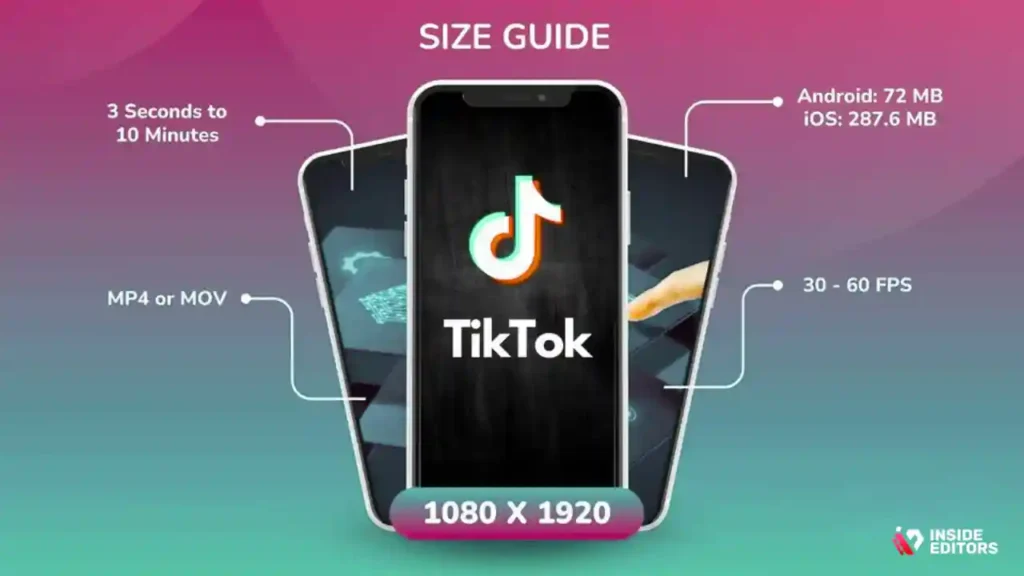
The optimal resolution for the TikTok Video Size is 1080 x 1920 pixels.
- Width: 1080 pixels
- Height: 1920 pixels
This resolution is considered Full HD (FHD) and ensures your video looks crisp and professional on the vast majority of mobile devices. While TikTok can accept lower resolutions (like 720p), using 1080p future-proofs your content and provides a better viewing experience.
File Format and Length Constraints
Beyond dimensions, two other technical details impact upload success:
- File Format: TikTok primarily supports
.MP4and.MOVfiles. For animated or graphic-heavy content,.AVIand.GIFare sometimes accepted, but.MP4is the industry standard for reliable, high-quality compression. - File Size and Length: Videos uploaded from a mobile device can be up to 287 MB. Videos uploaded from a desktop browser can be up to 1 GB. While TikTok allows videos up to 10 minutes long, the sweet spot for maximum engagement often remains between 15 and 60 seconds.
If you find these technical details overwhelming, remember that professional video editing services handle these specifications automatically. At Inside Editors, our team ensures every video meets platform-specific requirements, saving you the headache of troubleshooting file formats and resolutions. Learn more about our professional video editing services and how we guarantee perfect formatting every time.
Why TikTok Video Size Matters for Engagement

It might seem like a minor technicality, but the dimensions of your video directly impact how the TikTok algorithm perceives and promotes your content.
1. Algorithm Preference and User Experience
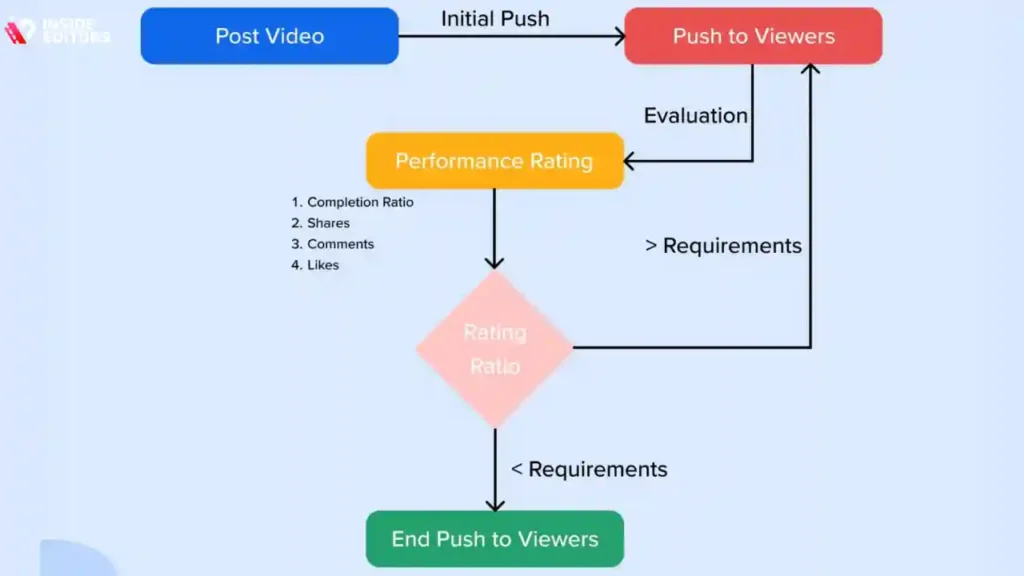
TikTok’s algorithm prioritizes videos that offer a seamless, native viewing experience. A video that fills the screen (9:16) is inherently more immersive than one with distracting black borders.
“Immersive content is sticky content. If the user has to mentally adjust to a non-native format, the likelihood of them scrolling past increases exponentially.” – Dr. Elena Rodriguez, Media Psychology Researcher
Videos with incorrect dimensions often suffer from reduced watch time and lower completion rates because they look unprofessional or require the user to tilt their phone. The algorithm interprets these poor metrics as low-quality content, resulting in suppressed reach.
2. The Safe Zone: Avoiding UI Obstruction
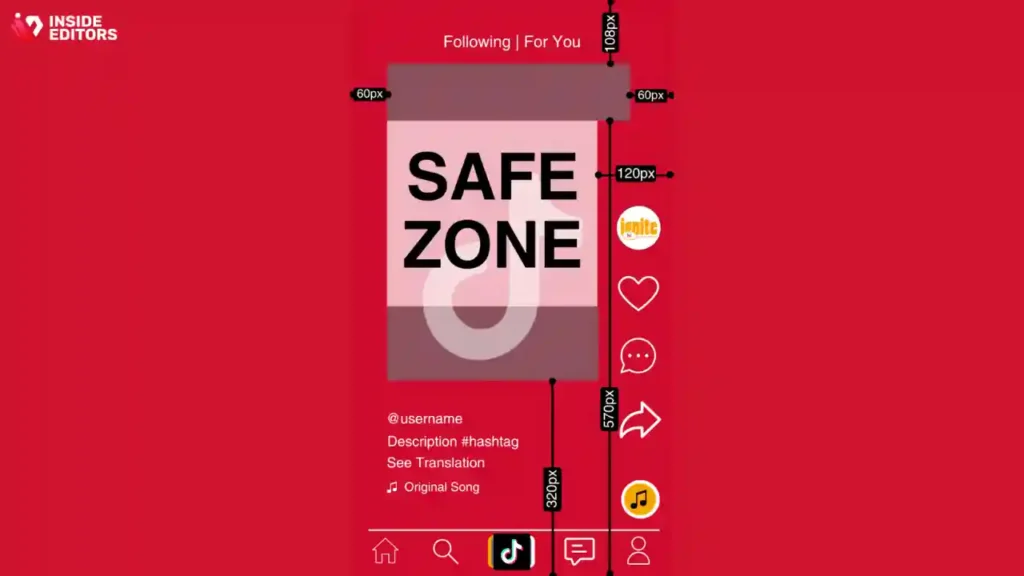
When you upload a video, TikTok overlays several user interface (UI) elements: the profile picture, description text, like/comment buttons, and the sound icon. These elements occupy specific areas of the screen, particularly the bottom and the right side.
If critical text, subtitles, or action takes place too close to the edges, it will be obscured by the UI, making the video confusing or ineffective. Understanding the TikTok Video Size isn’t just about the frame; it’s about knowing the “safe zone.”
The TikTok Safe Zone Dimensions (Approximate)
| Area | Pixels to Avoid (From Edge) |
|---|---|
| Top | 150 pixels |
| Bottom | 420 pixels |
| Left | 65 pixels |
| Right | 350 pixels (where the icons live) |
Always keep essential elements centered within the main 1080×1920 frame, ensuring they are well clear of the bottom 420 pixels where the caption and navigation buttons reside. This is especially important when using video editing for social media, as platforms like Instagram Reels have slightly different safe zones.
3. Maintaining Brand Consistency and Quality
For businesses and serious creators, every piece of content is a reflection of the brand. A video that is perfectly sized, sharp (1080p), and correctly framed conveys professionalism and attention to detail.
Conversely, poorly formatted videos suggest haste or lack of expertise, eroding viewer trust. Ensuring the perfect TikTok Video Size is a non-negotiable aspect of maintaining high production standards.
Quick Tutorial: How to Check and Adjust Your Video Size
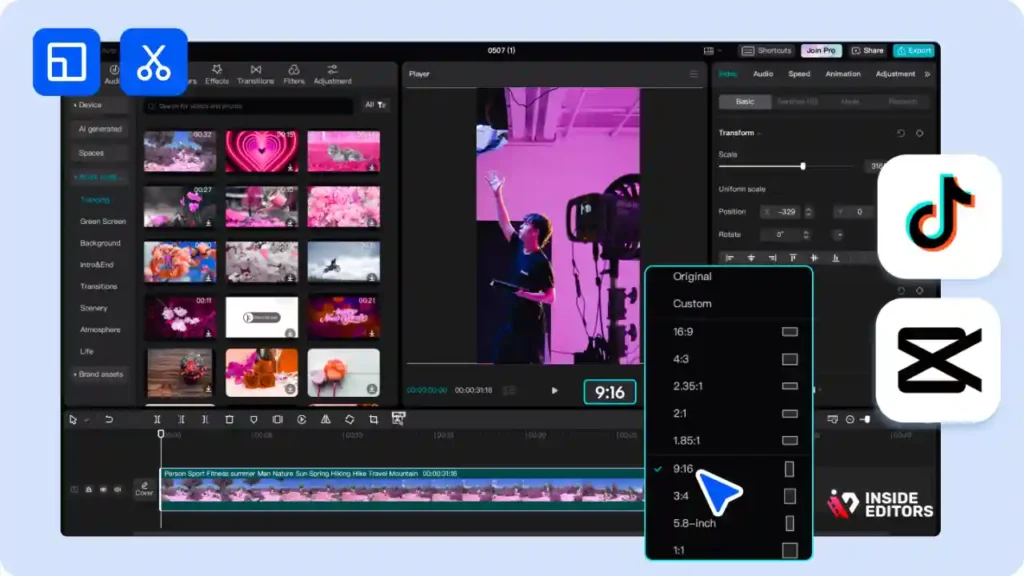
Whether you are filming on a phone or exporting from professional software, these steps ensure your video meets the 9:16 standard.
Step 1: Filming for 9:16
The easiest way to ensure the correct TikTok Video Size is to film vertically from the start.
- Smartphone Users: Always hold your phone upright (portrait mode) when recording. Modern phone cameras automatically capture in 9:16 or a similar vertical aspect ratio.
- DSLR/Mirrorless Users: If you are filming with a traditional camera, you have two options:
- Physically turn the camera 90 degrees on the tripod.
- Shoot in 16:9 (horizontal) and plan to crop the video vertically in post-production. Caution: This will significantly reduce your vertical resolution and is generally discouraged.
Step 2: Editing Software Settings
When using editing software (like Adobe Premiere Pro, Final Cut Pro, or DaVinci Resolve), you must manually set the sequence or project settings to the correct dimensions before importing your footage.
Process in Most Editing Software:
- Create a New Project/Sequence.
- Under Resolution or Frame Size, set the dimensions to 1080 (Width) x 1920 (Height).
- Import your vertical footage. If you shot correctly, the footage should snap into place, filling the frame.
If you are working with horizontal footage, you will need to scale and reposition it within the 9:16 frame, often resulting in lost visual information on the sides.
Step 3: Export Settings Verification
The final step is the export, where compression and final dimensions are locked in.
| Export Setting | Recommended Value |
|---|---|
| Resolution | 1080 x 1920 |
| Aspect Ratio | 9:16 |
| Frame Rate | 24, 25, 30, or 60 FPS (30 FPS is common) |
| Codec | H.264 |
| Format | MP4 |
If you are struggling with export settings or need complex edits, outsourcing is often the most efficient solution. Our experts specialize in optimizing video output for maximum quality and platform compatibility. We can edit your video for you quickly and affordably.
Common Mistakes and How to Avoid Them
Even experienced creators sometimes make small errors that compromise the final quality of their TikTok uploads.
Mistake 1: Uploading Horizontal (16:9) Videos
This is the most frequent mistake. A 16:9 video uploaded to TikTok will be automatically pillarboxed (black bars on the left and right).
How to Avoid: Always prioritize filming and editing in the 9:16 vertical format. If you must use 16:9 footage (e.g., b-roll or cinematic shots), zoom in on the most critical part of the frame to fill the 9:16 canvas, or creatively use graphics/backgrounds to mask the black bars.
Mistake 2: Ignoring the Safe Zone
Placing text too low or too far to the right means the TikTok UI will cover it. This is particularly problematic for calls-to-action (CTAs) or subtitles.
How to Avoid: Use editing templates or guides that clearly mark the safe zones. If you are adding subtitles, ensure they are positioned centrally, well above the bottom 420-pixel margin.
Mistake 3: Incorrect Bitrate and Compression
While TikTok handles compression, starting with a high-quality source file is essential. If your video looks blocky or blurry, it might be due to a low export bitrate.
How to Avoid: Export with a variable bitrate (VBR) targeting 8-10 Mbps for 1080p footage. This ensures a high-quality file that TikTok can compress without significant loss of detail. If you are unsure about these technical settings, consider using a specialized video editing company that guarantees high-fidelity exports.
Pros and Cons of Different Aspect Ratios on TikTok
| Aspect Ratio | Pros | Cons |
|---|---|---|
| 9:16 (1080×1920) | Fills the screen, immersive, favored by the algorithm, maximized engagement. | Requires vertical filming/editing, less versatile for cross-platform use (e.g., YouTube). |
| 16:9 (1920×1080) | Standard for traditional media, easy to shoot, high resolution. | Pillarboxed on TikTok, reduced engagement, looks unprofessional, wastes screen real estate. |
| 1:1 (1080×1080) | Good for Instagram posts, versatile. | Letterboxed on TikTok, does not utilize the full vertical screen, lower engagement than 9:16. |
Scaling Content: Time to Outsource Editing?
For content creators, marketers, and businesses, maintaining a high volume of perfectly formatted, engaging TikTok videos can quickly become a full-time job. This is where leveraging professional expertise becomes invaluable.
The technical requirements, from achieving the perfect TikTok Video Size to ensuring optimal color grading and sound mixing, demand significant time and specialized knowledge.
Why Inside Editors is Ideal Partner for TikTok Content
We understand that your focus should be on generating great ideas and connecting with your audience, not wrestling with aspect ratios and bitrates. Inside Editors offers specialized video editing services designed to scale your content output while guaranteeing professional quality.
Our Service Commitment:
- Expertise: Our professional editing team has 10+ years of experience and is fluent in the specific requirements of every major social platform, including the precise TikTok Video Size specifications.
- Speed: We offer fast turnaround times (24-72 hours) so you can maintain a consistent posting schedule without delay.
- Affordability: Starting at just $29/video, we provide a cost-effective alternative to hiring an in-house editor.
- Quality Assurance: We include professional color grading and audio enhancement, ensuring your content looks and sounds flawless. Find professional video editors who understand the nuances of vertical video.
“Outsourcing repetitive, technical tasks like video formatting and editing frees up creators to focus on their core genius: storytelling and audience connection.” – Michael Chen, CEO of Inside Editors
By partnering with Inside Editors, you gain a scalable solution that ensures every piece of content adheres to the perfect TikTok Video Size and quality standards, allowing you to focus on growth. We also offer specialized services like real estate video editing and eCommerce video editing to meet diverse industry needs.
Final Takeaways on the Perfect TikTok Video Size
Achieving the perfect TikTok Video Size is not just a technical requirement-it’s a strategic decision that directly impacts your content’s performance and professionalism.
The core rule is simple: Always aim for 1080 x 1920 pixels, which corresponds to the 9:16 vertical aspect ratio.
By adhering to these dimensions and respecting the UI safe zones, you ensure that your videos are immersive, easily digestible, and favored by the TikTok algorithm. Whether you are a seasoned creator or just starting out, mastering these specifications is the key to unlocking your full potential on the platform.
If the technical demands of editing and formatting distract you from creating, remember that professional help is available. Ready to elevate your content quality and consistency? Contact us for a free video editing consultation today and let Inside Editors handle the technical perfection, so you can focus on going viral.
Frequently Asked Questions
What is the best TikTok video resolution?
The ideal TikTok video resolution is 1080 x 1920 pixels. This matches the standard 9:16 aspect ratio of modern smartphones, ensuring your content fills the entire screen vertically without black bars. Maintaining this high resolution is crucial for video quality and audience engagement on the platform.
What is the required TikTok aspect ratio?
TikTok requires a vertical aspect ratio of 9:16. While you can upload 16:9 horizontal videos, they will appear with black bars above and below, significantly shrinking your content. Using the full vertical screen space maximizes visibility and adheres to the platform’s native viewing experience.
Can I upload 4K video to TikTok?
Yes, you can upload 4K videos, but TikTok will compress them down to 1080p resolution for playback. While shooting in 4K might offer slightly better source quality before compression, the final displayed resolution will be 1080 x 1920 pixels. Focus on maintaining the correct 9:16 aspect ratio.
What size should my TikTok thumbnail be?
TikTok thumbnails are displayed in a square format on your profile grid, typically around 1080 x 1080 pixels. However, the thumbnail is actually a frame taken directly from the video itself. Ensure the most engaging part of your video is visible within the center square area for the best visual impact.
What is the maximum TikTok video file size?
The maximum file size for a TikTok video upload is 287.6 MB for iOS and Android devices. For desktop uploads, the limit is higher, set at 1 GB. If your video exceeds these limits, you will need to compress the file before attempting to upload it to the platform.
How long can a TikTok video be?
TikTok currently allows videos up to 10 minutes in length. However, shorter videos, typically 7 to 15 seconds, often perform better due to the platform’s fast-paced consumption model. For optimal engagement, match the video length to the content’s complexity.
Why are my TikTok videos blurry?
Blurry videos often result from incorrect export settings or poor internet connection during upload. Always export your video at the native TikTok video size (1080 x 1920) and ensure the frame rate is 30fps or 60fps. Check if the ‘Data Saver’ setting is off during viewing or uploading.


