

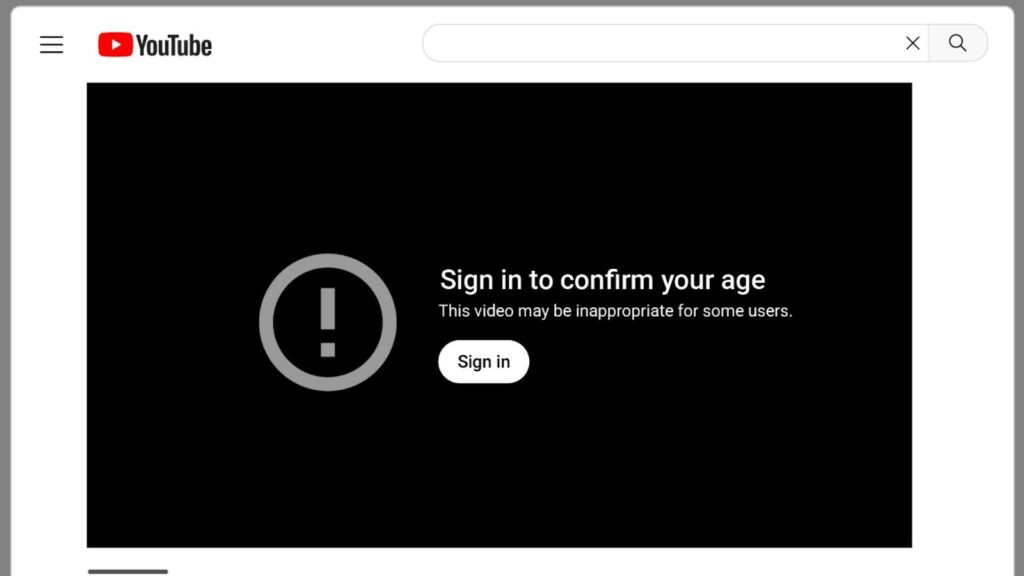
Have you ever found yourself falling down a YouTube rabbit hole, only to be stopped dead in your tracks by a “Sign in to confirm your age” warning? It is one of the most common frustrations on the platform, especially when you are trying to gather clips for a project or save a documentary for a long flight. In 2026, YouTube’s age-gating algorithms have become more sophisticated than ever, making it a bit trickier than it used to be to simply click and save.
The good news is that you are not stuck. Whether you are an editor looking for historical footage or just someone who prefers watching content offline without constant prompts, there are several reliable ways to download age restricted youtube videos. In this guide, we are going to walk through the most effective, safe, and modern methods available this year. We want to make sure you can get the content you need without jumping through endless hoops.
At Inside Editors, we see creators dealing with these hurdles all the time. When you are deep in the zone, the last thing you want is a technical wall preventing you from getting the raw material you need. That is why we have put together this comprehensive look at how to download age restricted youtube videos so you can spend less time troubleshooting and more time actually enjoying your content or working on your next big video project.
Understanding Why YouTube Restricts Certain Content
Before we dive into the “how,” it is helpful to understand why these restrictions exist in the first place. YouTube applies age gates to content that might contain violence, suggestive themes, or sensitive historical topics. While this is great for keeping the platform safe for younger audiences, it often catches perfectly educational or artistic content in its net. By the time 2026 rolled around, these filters became even stricter due to new global digital safety regulations.
When you try to download age restricted youtube videos through a standard “online downloader” website, they almost always fail. This is because those websites act as “anonymous” viewers. Since they aren’t logged into an adult account, YouTube refuses to send them the video data. To successfully save these videos, you essentially need a tool that can “prove” to YouTube that it has permission to view the content, usually through something called browser cookies or authentication.
The Most Reliable Desktop Solutions in 2026
If you are serious about building an offline library, desktop software is by far the most stable way to download age restricted youtube videos. Unlike browser-based tools that often get shut down or riddled with intrusive ads, desktop applications can handle the complex authentication required for age-gated content.
One of the top-rated tools this year is 4K Video Downloader Plus. It has a built-in browser that allows you to sign into your YouTube account directly within the app. This is a game-changer because once you are logged in, the software inherits your “adult” status, allowing you to download age restricted youtube videos just as easily as any other clip. It supports high resolutions like 4K and 8K, ensuring that the quality remains crisp, which is something we always prioritize at Inside Editors when we’re looking for high-quality assets.
Another powerhouse for the more tech-savvy user is yt-dlp. It is a command-line tool, which might sound intimidating, but it is incredibly effective. The reason it’s so popular in 2026 is its ability to “pass cookies” from your web browser. This means if you are logged into YouTube on Chrome or Firefox, you can tell yt-dlp to use those login credentials to bypass the age gate. It is the gold standard for anyone who needs to download age restricted youtube videos in bulk or with specific technical requirements.

Using Browser Extensions and Mobile Apps
For those who don’t want to install heavy software, browser extensions can be a middle-ground solution. However, you have to be careful here. Many extensions that claim to help you download age restricted youtube videos can be hit-or-miss because YouTube frequently updates its code to block them. In 2026, the most successful extensions are those that act as “wrappers” for the video player, allowing you to capture the stream directly while you are already logged in and watching the video.
On the mobile side, things are a bit more restricted, especially on iOS. Android users still have access to open-source gems like NewPipe, which has been updated specifically to handle 2026’s security protocols. NewPipe allows you to view and save content without even needing a Google account, although sometimes it still requires a little bit of manual tweaking in the settings to bypass the most stubborn age gates.
Troubleshooting Common Download Errors
Even with the best tools, you might run into an error message like “Video unavailable” or “Sign in to confirm.” If you are trying to download age restricted youtube videos and it keeps failing, the first thing to check is your authentication. Usually, the “cookies” have expired, or the software needs an update to match YouTube’s latest security patch.
Another common issue is regional blocking. Sometimes a video isn’t just age-restricted; it might be blocked in your specific country. In these cases, combining your downloader with a high-quality VPN is the best approach. By setting your location to a region with more relaxed content laws, you can often unlock the video and proceed with the download as usual. We often suggest this to our clients at Inside Editors when they are sourcing international content for global brands.

Advanced Techniques to Bypass Age Restrictions
If you are looking to get a bit more technical, there are some clever workarounds that don’t even require heavy software installations. These methods have been around for a while but remain surprisingly effective in 2026 for those who want to download age restricted youtube videos without a lot of fuss.
One classic trick is using the “Embed” link. Normally, when you watch a video, the URL looks like youtube.com/watch?v=VIDEO_ID. If you change that URL to youtube.com/embed/VIDEO_ID, you can often view the video in a full-window player that bypasses the initial age gate check. While this is great for watching, it also makes it easier for some simple browser-based “capture” tools to grab the video stream since the intrusive login overlays are removed.
Another popular method is the “NSFW” trick. By simply typing “nsfw” before “youtube.com” in the address bar (e.g., nsfwyoutube.com/watch?v=…), you are redirected to a third-party site that mirrors the content without the restriction. At Inside Editors, we generally suggest caution with these types of mirror sites as they can be heavy on ads, but in a pinch, they are a quick way to download age restricted youtube videos when you just need a single file immediately.
Mastering yt-dlp: The Professional Choice
For power users, no guide would be complete without a deeper look at yt-dlp. This is the tool used by many professional archival teams and high-end editing houses. The reason it is so powerful is its “Authentication Options.” If you have a Google account that is verified as 18+, you can use the command line to tell yt-dlp exactly how to pretend it is you.
The most common command used today is yt-dlp –cookies-from-browser chrome [URL]. This tells the software to look at your active Chrome session, find your YouTube login cookies, and use them to authorize the download. This is the most consistent way to download age restricted youtube videos because it uses legitimate credentials. It completely eliminates the “Sign in to confirm your age” error.
If you are on a Mac or Linux system, you might need to use a slightly different syntax or export your cookies to a text file first. While this sounds like a lot of work for a beginner, it is a skill that pays off. Once you have yt-dlp set up on your machine, you can download age restricted youtube videos with a single line of text, often at speeds much faster than any website could offer.
Why Quality Matters for Your Downloads
When you are downloading content, especially for creative work, quality should be your top priority. Many free online tools will cap your resolution at 720p or even 360p. In 2026, where 4K is the standard for most displays, low-quality footage can ruin a professional-looking project. Tools like SnapDownloader or 4K Video Downloader Plus are excellent because they allow you to select the specific codec and resolution you want.
At Inside Editors, we always recommend downloading in the highest available bitrate. This gives the most “room” to work with during the editing process. If you download a highly compressed version of a video, you will notice “artifacts” or blocky squares in the dark areas of the image. By choosing a high-quality source, you ensure that the final result-whether it’s a short social media clip or a long-form video-looks sharp and professional.

Safety and Legal Considerations in 2026
It is important to touch on the “rules of the road.” In 2026, digital copyright laws are more strictly enforced than they were a decade ago. While it is generally considered safe for personal use to download age restricted youtube videos, you should always be mindful of how you use that content. Re-uploading someone else’s work as your own can lead to copyright strikes or even legal trouble.
The best practice is to use these downloads for educational purposes, personal archives, or as “Fair Use” material in a transformative way. If you are a creator, always try to credit the original source. Most creators don’t mind their footage being used if it is handled with respect and adds something new to the conversation.
Furthermore, always ensure the tools you are using are from reputable sources. The internet is full of “Free YouTube Downloader” apps that are actually just shells for malware or data-stealing scripts. Stick to the well-known names we’ve mentioned in this guide to keep your computer and your personal data safe.
Frequently Asked Questions for Beginners
Can I download age-restricted videos without a Google account? It is difficult but possible. Some tools like NewPipe (on Android) or specific proxy-based sites can sometimes bypass the gate without an account. However, for the most reliable experience, being signed into a verified account is the way to go.
Is it safe to use my main Google account with these downloaders? Most reputable desktop software is safe, but there is always a tiny risk of account flagging if you download hundreds of videos in a very short time. To be extra safe, some users prefer to use a secondary “burner” account that is also age-verified.
What is the best format to save these videos in? For most users, MP4 is the best balance of quality and file size. If you are planning to do heavy editing, look for MKV or WebM options, which often preserve even more detail from the original YouTube stream.

Elevate Your Content with Inside Editors
Learning how to download age restricted youtube videos is a fantastic technical skill, but it is just the beginning of the creative journey. Once you have your library of footage, the real challenge is stitching it together into a story that captivates your audience. This is where many people feel overwhelmed by the sheer amount of work required in the editing booth.
If you find yourself with a folder full of great clips but no time to turn them into a polished video, let us help. Inside Editors offers premium Video Editing Services that cater to your specific needs. Whether you are a YouTuber looking for a faster turnaround or a business needing a high-end promotional video, we bring years of expertise to every frame.
Our team at Inside Editors doesn’t just cut clips; we craft experiences. We handle everything from the initial rough cut to advanced color grading, motion graphics, and crystal-clear audio mixing. By partnering with us, you can focus on the creative “big picture” while we handle the technical heavy lifting. We take the raw materials you’ve worked hard to find and turn them into a finished product that stands out in the crowded digital landscape of 2026.


