

If you’ve spent any time scrolling through TikTok lately, you’ve probably noticed creators sharing a viral tiktok photo editing hack that makes everyday photos look cinematic, vibrant, and hyper-polished – without expensive apps, without pro gear, and without complicated workflows. What started as a simple trend has turned into a full-blown method used by influencers, small business owners, and everyday users who just want their photos to pop.
But here’s the interesting thing: most people attempting it are either using the wrong settings or over-editing their photos, which leads to washed-out colors, harsh shadows, or skin tones that look unnatural. In this guide, we’ll break down what the hack is, why it works, how you can apply it correctly, mistakes to avoid, and pro-level improvements that make your photos even more viral-ready.
Whether you want better selfies, aesthetic portraits, travel shots, or branded content, this guide will show you how to master the tiktok photo editing hack like a pro.
What Exactly Is the TikTok Photo Editing Hack?

At its core, the tiktok photo editing hack is a combination of iPhone or Android editing sliders that dramatically enhance color, contrast, and detail in a single image. The goal is to create a warm, dreamy, saturated look that feels polished but still natural – the type of visual style that performs extremely well on TikTok’s algorithm.
Creators love it because:
- It’s beginner-friendly
- It works on travel, portraits, pets, and lifestyle shots
- It requires no premium apps
- It instantly transforms dull photos
- It’s easy to replicate and customize
The reason this hack exploded is because TikTok made visual storytelling more important than ever. Even if you aren’t a professional photographer, your visuals now need to stand out in under 0.3 seconds – and this hack gives your content a better chance of grabbing attention.
How to Do the TikTok Photo Editing Hack

Although different variations exist, most creators follow a similar editing sequence. Below is the cleanest and most consistent method.
Step 1: Start With a Clear Original Photo
Before applying any settings, make sure your image has:
- Natural light or soft artificial light
- A steady focus
- A simple background
- A subject with enough contrast to stand out
The hack enhances what’s already there – it can’t fully fix a blurry or poorly lit image.
Step 2: Open the Native Editor (iPhone or Android)
Most creators use:
- iPhone Photos → Edit → Adjust
- Android Photos / Google Photos → Edit → Adjust
You don’t need Lightroom or VSCO for the core version of this hack.
The Most Popular TikTok Editing Settings

These are the settings that went viral – and they’re still the most shared version of the tiktok photo editing hack.
1. Turn the Brilliance Up
Brilliance: +70 to +85
This slider instantly brightens the image while preserving depth and detail.
2. Increase Exposure Slightly
Exposure: +5 to +15
This brightens the overall scene but avoid going too high.
3. Increase Highlights
Highlights: +50 to +70
This is what creates the glowing, dreamy aesthetic.
4. Reduce Shadows
Shadows: –20 to –40
This gives your subject more definition and helps reduce flatness.
5. Boost Contrast
Contrast: +15 to +25
Adds clarity and depth – just don’t overdo it.
6. Increase Saturation
Saturation: +10 to +25
This brings out the colors and makes the photo feel lively.
7. Increase Vibrance
Vibrance: +20 to +40
More subtle than saturation; enhances dull colors selectively.
8. Add Warmth
Warmth: +10 to +20
This creates the signature “golden” look of the trend.
9. Add a Sharpening Boost
Sharpness: +20 to +35
Makes edges crisp and gives a polished feel.
10. Optional: Increase Definition
Definition: +10 to +25
Adds micro-contrast, great for landscapes and outfits.
Why This TikTok Photo Hack Works So Well

You might wonder – why do these specific settings look good on so many types of photos?
There’s a psychological and technical explanation.
TikTok favors punchy visuals
Content with high contrast and rich colors grabs attention faster. This aligns perfectly with TikTok’s fast-scroll behavior.
The human eye loves warm tones
Warm colors evoke comfort, positivity, and aesthetic appeal – especially in lifestyle and travel content.
Balanced saturation makes photos “snackable”
Highly shareable images tend to be:
- Clear
- Colorful
- Clean
- Warm
- Balanced
This hack checks all those boxes.
Common Mistakes People Make With This Trend

Even though the steps are simple, many creators accidentally make their photos look unrealistic or oversaturated. Here are the pitfalls to avoid.
1. Overshooting the saturation
If your subject looks sunburned or your background looks neon, you’ve gone too far.
2. Ignoring skin tones
Always zoom in to ensure the face looks natural, not overly warm or harsh.
3. Using the exact same numbers every time
Each photo has unique lighting – treat the settings as a baseline, not a rule.
4. Over-sharpening
This can create grain or halos around edges.
5. Editing low-quality photos
No hack can rescue a heavily compressed or blurry image.
How to Make This Hack Look Even More Professional
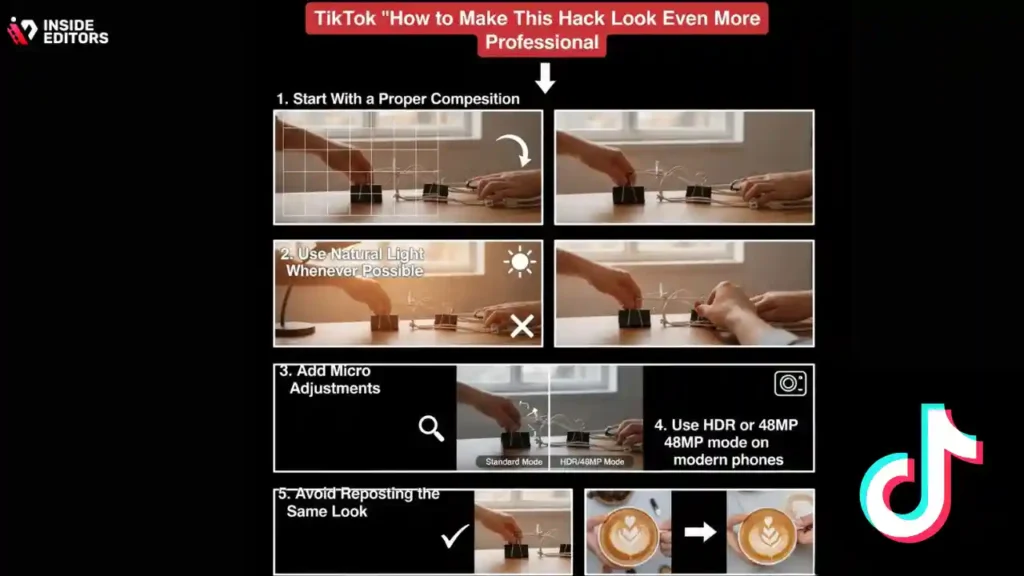
This is where many creators stop – but if you want your photos to stand out even more, try these pro-level improvements.
1. Start With a Proper Composition
Follow the rule of thirds. Center your subject if you’re aiming for a clean TikTok aesthetic.
2. Use Natural Light Whenever Possible
Soft daylight produces the best results with this hack.
3. Add Micro Adjustments
Small tweaks (like adjusting black point or tint) add depth without ruining the aesthetic.
4. Use HDR or 48MP mode on modern phones
This gives more editing flexibility and keeps textures intact.
5. Avoid Reposting the Same Look
Aesthetic fatigue is real. Switch up warmth, vibrance, or contrast depending on mood.
Situations Where the TikTok Photo Editing Hack Works Best

While the hack works on many images, it especially shines in:
- Golden-hour portraits
- City photos with colorful backgrounds
- Streetwear and fashion shoots
- Food photography
- Travel and nature shots
- Beach or vacation scenes
- Pets in outdoor lighting
- Aesthetic selfies
If the photo already has decent lighting and contrast, this hack amplifies it beautifully.
Advanced Versions of the TikTok Photo Editing Hack
As TikTok evolves, so do the editing trends. While the basic tiktok photo editing hack remains popular, creators now experiment with more advanced variations to match different aesthetics. These enhanced versions not only improve image quality but also help your photos stand out in a more saturated feed.
Below are the most effective advanced variations you can try.

1. The Cinematic Look (Moody & Rich)
This variation is ideal for portraits, nighttime shots, and travel photography with deep shadows or neon lights.
Adjustments:
- Exposure: –5 to –15
- Brilliance: +40
- Highlights: –30
- Shadows: –40
- Contrast: +30
- Saturation: +5
- Vibrance: +20
- Warmth: –10
- Tint: Slight green shift
- Sharpness: +25
- Vignette: +15 to +30
Why It Works:
The cinematic version of the tiktok photo editing hack creates mood and emotional depth. It introduces controlled darkness without losing detail, making the image feel like a still from a movie.
2. The Aesthetic White/Beige Look
Perfect for lifestyle, minimalism, room decor, cafes, and product shots.
Adjustments:
- Brightness: +20
- Highlights: +40
- Shadows: +10
- Contrast: –10
- Saturation: –5
- Vibrance: +10
- Warmth: +5
- Brilliance: +50
- Sharpness: +10
Why It Works:
This light, airy variation performs exceptionally well in home decor and fashion niches, two of TikTok’s strongest visual categories.
3. The Hyper-Vibrant Travel Look
Designed for beaches, nature trails, markets, colorful outfits, and sunsets.
Adjustments:
- Saturation: +25
- Vibrance: +40
- Warmth: +10
- Brilliance: +60
- Exposure: +10
- Sharpening: +30
- Definition: +25
Why It Works:
Travel photos rely on bold colors and high clarity. The enhanced saturation and definition push the photo into scroll-stopping territory without looking cartoonish.
How to Adapt the Hack for Android Users

Android phones have slightly different editing sliders, but the concept remains the same.
Recommended Android Adjustments:
- Auto Enhance: On
- Brightness: +10 to +20
- Contrast: +15
- Shadows: –20
- Highlights: +20
- White Point: Adjust until whites look clean
- Saturation: +10 to +20
- Warmth: +5 to +15
- Clarity: +15
- Sharpen: +20
Pro Tip:
Google Photos tends to soften grain automatically – great for selfies and skin tones.
Real Example: Before & After Using the TikTok Photo Editing Hack
Let’s walk through how the hack transforms a typical outdoor portrait.
Before:
- Flat lighting
- Low contrast
- Muted colors
- Subject blending with background
After Applying the Hack:
- Facial features gain definition
- Background becomes vibrant and warm
- Skin tone becomes lively and natural
- Entire image looks professionally enhanced
This transformation is exactly why the tiktok photo editing hack went viral – it consistently produces dramatic improvements with very little manual effort.
Tips for Keeping Your Photos Natural (Not Over-Edited)

Even though TikTok encourages bold visuals, professional editors recommend subtlety.
1. Zoom in repeatedly
Check skin texture, shadows, and edges.
2. Take breaks while editing
Your eyes adapt – a break resets your perception.
3. Avoid maxing out sliders
Anything above +40 or –40 often becomes unrealistic.
4. Fix color issues before fixing brightness
Many beginners do this backward.
5. Use real light, not just editing tools
The hack enhances good lighting – it cannot replace it.
Why Creators Trust Inside Editors for Photo & Video Content
Inside Editors specializes in high-quality editing services for creators, brands, marketing teams, and influencers who want premium visuals without spending hours learning editing tools.
With Inside Editors, you get:
- Expert editors with years of experience
- Consistent, brand-friendly aesthetics
- Faster turnaround than freelancer marketplaces
- Professional retouching and color grading
- Social-media-optimized output (TikTok, Reels, Shorts)
- Story-driven editing that increases engagement
Even if you use the tiktok photo editing hack for everyday posts, hiring a professional editor ensures your important content reaches the next level.
How to Know Which Version of the Hack to Use
Different visual styles work best depending on your theme:
| Your Content Type | Best Hack Version |
| Selfies | Original hack |
| Fashion | Cinematic or warm aesthetic |
| Travel | Hyper-vibrant version |
| Food | High-contrast warm tones |
| Home decor | Beige/light aesthetic |
| Pets | Original or vibrant |
| Product shots | Clean/bright version |
If you vary your content, mix and match the hack versions to keep your feed visually interesting.
TikTok Algorithm Tips for Boosting Photo Posts
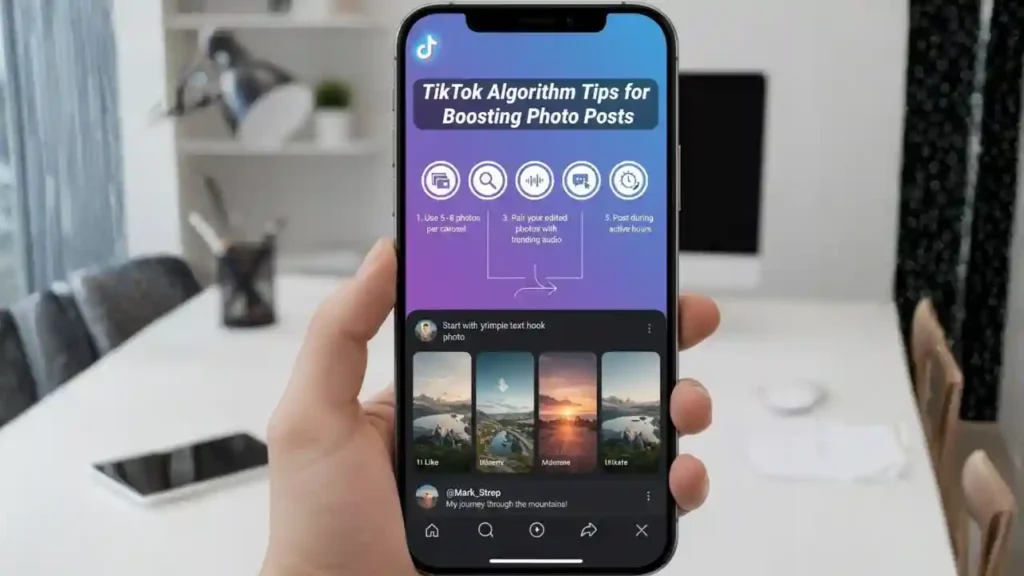
Now that TikTok supports photo carousels and static images, optimizing them is crucial.
1. Use 5–8 photos per carousel
This increases retention time.
2. Start with your strongest photo
The first slide determines performance.
3. Pair your edited photos with trending audio
Even for static posts, audio boosts visibility.
4. Add a simple text hook
Examples:
- “POV: I tried the TikTok photo editing hack”
- “This edit changed my entire feed”
- “Stop scrolling. Look at this glow.”
5. Post during active hours
Evenings and weekends perform best for photo content.
Final Tips for Mastering the TikTok Photo Editing Hack

To get the best results:
- Use the hack as a base, not a strict formula
- Adjust settings depending on lighting conditions
- Avoid making every photo look identical
- Use natural light to your advantage
- Keep colors vibrant but not extreme
- Remember that subtle edits often look the most professional
When used well, the tiktok photo editing hack can elevate your visuals to standout quality – but combining it with thoughtful composition and professional editing (when needed) takes your content even further.
Conclusion
The tiktok photo editing hack is one of the easiest and most effective ways to transform your photos into vibrant, eye-catching visuals that perform well on TikTok. Whether you’re new to editing or an experienced creator, this hack gives you a quick, reliable way to enhance your photos without expensive tools or complex workflows.
And when you want a consistent, polished aesthetic – especially for brand content, marketing visuals, or high-impact posts Inside Editors is here to help you create studio-quality edits that increase engagement, improve storytelling, and strengthen your online presence.
FAQ : About TikTok photo editing hack
1. Is the TikTok photo editing hack actually good for beginners?
Yes – it’s beginner-friendly because it uses basic sliders that most phones already include. It improves warmth, vibrance, and clarity without needing advanced tools or apps. The trade-off is limited precision, so professionals still prefer calibrated editing workflows. Most creators use the TikTok photo editing hack for quick posts, not long-term brand visuals.
2. How does the TikTok hack compare to using a professional editor?
The TikTok photo editing hack works well for casual posts, but professional editors provide consistent color grading, retouching, and brand-specific styles. DIY editing is faster and free, but quality varies depending on lighting and phone model. Professional services include revisions, file-safe storage, and rights-protected delivery.
3. How much does professional photo editing usually cost?
Most editors charge $5–$30 per photo, depending on complexity, retouching needs, and turnaround time. Packages for creators or small businesses typically range from $99–$399 monthly. Basic adjustments are cheaper, while advanced editing (skin retouching, color grading, composites) raises costs. Always confirm what’s included – revisions, source files, and usage rights.
4. How long does professional editing take compared to the TikTok hack?
The TikTok hack is instant, while professional editing takes 12–72 hours depending on project size. Rush delivery is often available for an added fee. Timelines depend on complexity, number of images, and required revisions. High-volume brand projects may take longer for quality checks.
5. Does the TikTok photo editing hack work on Android?
Yes – Android users can apply the same principles using Google Photos or built-in camera apps. Slider names differ slightly, but brightness, vibrance, warmth, and sharpness produce similar results. For best accuracy, adjust white balance first, then color and detail.
6. Are TikTok’s editing tools better than third-party apps?
TikTok tools are convenient and good for quick adjustments, but apps like Lightroom, Snapseed, and VSCO offer more control. Third-party editors provide masking, selective edits, and RAW support. TikTok is ideal for fast content; apps or professionals are better for brand-level quality.
7. Do I own the photos after a professional edits them?
Yes – reputable editors give you full ownership of your final edited images. Most also allow commercial use unless stated otherwise in the contract. Keep in mind the editor retains a license to display work in their portfolio unless you request privacy.
8. Are my files safe when working with a professional editor?
Trusted editors use encrypted storage and private sharing links. They do not reuse, resell, or distribute your images. If you require NDA-level privacy, most professional editing services can provide it. Avoid sending sensitive content through unsecured messaging apps.
9. How do I know if I should hire an editor instead of using the TikTok hack?
If you need consistent style, color accuracy, or professional retouching, an editor is the better choice. The TikTok photo editing hack is great for casual posts but limited for product shoots, campaigns, or branding. Consider your goals: speed vs. long-term quality.
10. What’s the easiest way to apply the TikTok photo editing hack?
Open your phone’s photo editor, start with brightness and warmth, then adjust vibrance, highlights, and sharpness. Compare before/after frequently to avoid over-editing. Save your preferred settings as a preset if your device allows it. This keeps results consistent across multiple photos.


