

In the fast-paced world of short-form video, capturing attention in the first two seconds is the ultimate challenge. TikTok, the undisputed king of viral content, demands not just creativity, but technical precision. For content creators and marketers looking to break through the noise, understanding the nuances of professional tiktok video editing is non-negotiable.
This comprehensive guide, brought to you by the experts at Inside Editors, delves into the advanced techniques and secret strategies that transform good videos into viral sensations. We will explore the critical elements of pacing, sound design, visual hooks, and seamless transitions-the true backbone of high-performing TikTok content.
The Foundation of Virality: Why Advanced TikTok Video Editing Matters
The TikTok algorithm prioritizes content that maximizes watch time and engagement. While a great concept gets the door open, superior tiktok video editing is what keeps viewers glued to the screen and encourages shares. It’s the difference between a casual scroll-stopper and a video that defines a trend.
“In short-form video, every millisecond counts. Editing isn’t just about cutting scenes; it’s about controlling the viewer’s emotional journey and maintaining relentless pace.” – Sarah Jenkins, Digital Content Strategist
Effective editing addresses the core challenge of the platform: the short attention span. By implementing professional-grade techniques, you can manipulate rhythm, build suspense, and deliver the payoff faster, ensuring your content meets the high standards set by the platform’s most successful creators.
The E.E.A.T. Standard in Short-Form Content
For content to truly resonate and be deemed authoritative (a key component of Google’s E.E.A.T. framework), the production quality must reflect expertise. Sloppy cuts, poor audio, or inconsistent color grading signal amateur status. Professional tiktok video editing elevates your brand, establishing trust and authority, whether you are selling a product or sharing a dance tutorial.
If the technical demands of maintaining this quality distract you from creating content, remember that specialized support is available. We at Inside Editors offer professional Video Editing Services designed specifically to handle the technical heavy lifting, ensuring your vision is executed flawlessly.
Secret 1: The Pacing Paradox – Faster Than You Think
The most significant difference between traditional video editing and TikTok editing is pacing. Traditional pacing allows for breathing room; TikTok pacing is relentless. Viral content rarely lingers on a single shot for more than 1-2 seconds.
Mastering the Jump Cut and Micro-Edits
The jump cut, often avoided in long-form media, is a staple of TikTok. It serves to eliminate dead air, awkward pauses, and unnecessary movement, keeping the energy consistently high.
Actionable Steps for Pacing:
- Trim Aggressively: Review your raw footage and cut out every instance where the speaker pauses, breathes, or repeats a phrase. If a clip doesn’t advance the narrative or provide a visual hook, remove it.
- Use Micro-Edits: Aim for cuts that are less than 1.5 seconds long, especially in the first five seconds. This rapid-fire delivery signals to the viewer that the content is dense and worth watching.
- Sync Cuts to Sound: Align visual cuts precisely with beat drops, sound effects, or vocal emphasis in your chosen audio track. This creates a satisfying, rhythmic viewing experience that feels professional.
The Power of the First Three Seconds
The “hook” is paramount. Your tiktok video editing must ensure that the most compelling visual or the clearest statement of value appears immediately. Many viral videos use a reverse structure, showing the final result or the most shocking moment first, before cutting back to the beginning to explain the process.
| Pacing Style | Traditional Video (YouTube/TV) | TikTok (Viral Content) |
| Average Shot Length | 3-7 seconds | 0.8-2 seconds |
| Purpose of Pauses | Dramatic effect, viewer comprehension | Non-existent; signals viewer drop-off |
| Key Editing Tool | Dissolves, J-cuts, L-cuts | Jump cuts, sound-synced cuts |
Secret 2: Sound Design as the Primary Narrative Driver
On TikTok, sound is not secondary-it is the primary driver of trends and engagement. The right audio track can instantly categorize your video and tap into existing viral momentum. However, simply adding a trending song isn’t enough; professional sound design is crucial.
Layering Audio for Maximum Impact
Successful TikTok videos often feature three distinct layers of audio, seamlessly blended through expert tiktok video editing:
- The Trending Track: The music or sound effect that draws viewers in via the algorithm.
- Voiceover/Dialogue: The core message or narrative delivered by the creator.
- Sound Effects (SFX): Subtle noises (whooshes, pops, clicks) that emphasize visual actions or transitions.
“If the video is the body, the sound is the heartbeat. Without precise audio mixing and perfectly timed SFX, the body is lifeless.” – Alex Chen, Audio Post-Production Specialist
Common Audio Pitfalls to Avoid
- Inconsistent Volume: Ensure your voiceover is clearly audible above the trending music. Use ducking (automatically lowering the music volume when dialogue occurs).
- Poor Microphone Quality: Viewers will abandon a video with poor audio faster than one with slightly shaky video. Invest in a dedicated microphone or utilize professional audio editing services to clean up background noise and enhance clarity.
- Mismatched SFX: Sound effects must match the visual action. A poorly timed “pop” or “swoosh” breaks immersion instantly.
Secret 3: Seamless Transitions and Visual Continuity

Transitions are the bridges between scenes. On TikTok, these transitions must be invisible, instantaneous, or serve as a visual spectacle themselves. Mastering transitions is a cornerstone of advanced tiktok video editing.
The Power of the Match Cut
The match cut is a technique where the end of one shot visually or compositionally matches the beginning of the next, creating a smooth, almost magical flow. Examples include:
- Action Match: Cutting from a hand reaching out in one scene to the same hand grabbing an object in the next.
- Shape Match: Transitioning between two objects that share a similar shape (e.g., a spinning coin transitioning to a spinning plate).
These cuts require meticulous planning during shooting and precise execution during the edit. If you need help coordinating complex multi-shot videos, our team of experts can assist with detailed post production services.
Why In-App Editing Isn’t Always Enough
While TikTok’s native editor is convenient for quick posts, achieving professional-level transitions, color grading, and complex overlays often requires dedicated software (like CapCut, DaVinci Resolve, or Premiere Pro).
| Feature | In-App Editor (TikTok) | Professional Software (e.g., CapCut Pro) |
| Color Grading | Limited filters and basic adjustments | Full color wheels, scopes, LUT support |
| Keyframing | Basic text/sticker movement | Precise control over position, scale, opacity |
| Masking | Limited shape masks | Advanced custom masks and rotoscoping |
| Audio Control | Basic volume sliders | Multi-track mixing, noise reduction, compression |
For creators who prioritize speed and quality, outsourcing the technical editing process is often the most efficient route. Our Tiktok Video Editing service ensures your content looks professionally produced, allowing you to focus purely on content creation.
Secret 4: Dynamic Text and Visual Overlays

Text overlays are essential for accessibility (viewers watching without sound) and for reinforcing key points. However, static text is boring. Viral content uses dynamic text that moves, appears, and disappears in sync with the dialogue and action.
Keyframing for Engagement
Keyframing is the process of setting specific points in time to control a visual element’s properties (size, position, rotation, opacity).
How to Use Keyframing in TikTok Editing:
- Zoom-Ins on Key Words: As you say an important word, keyframe the text to quickly zoom in and then snap back to normal size.
- Tracking Text: If you are moving, keyframe the text to follow your movement across the screen, ensuring it stays visible and relevant.
- Pop-Up Reveals: Keyframe text to appear quickly (0% opacity to 100%) right as the corresponding audio is spoken, reinforcing the message instantly.
The Importance of Subtitles
High-quality, accurate subtitles are crucial for maximizing reach. They should be easy to read (high contrast, appropriate size) and appear precisely when the words are spoken. This small detail significantly increases watch time and caters to viewers in noisy environments.
Secret 5: Color Grading and Visual Consistency
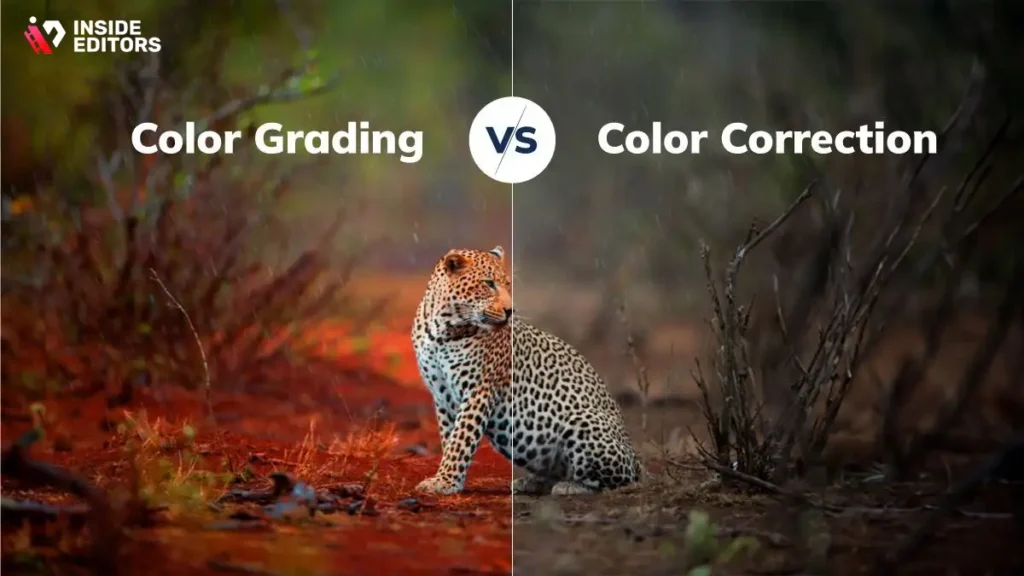
While TikTok is often spontaneous, the most successful creators maintain a consistent visual brand. This is achieved through professional color grading-the process of enhancing or altering the color of a video to achieve a specific mood or look.
Establishing Your Visual Signature
Color grading can make a mundane scene look cinematic, vibrant, or dramatic. Consistency across all your videos reinforces brand recognition.
Steps for Effective Color Grading:
- Correction First: Adjust white balance, exposure, and contrast to ensure the footage looks natural.
- Creative Grade: Apply a specific Look Up Table (LUT) or manually adjust hues and saturation to achieve your signature style (e.g., warm and cozy, cool and modern, high-contrast and punchy).
- Skin Tone Check: Always ensure that creative grading does not distort natural skin tones.
The Pitfalls of Over-Editing
While dynamic editing is key, over-editing can be detrimental. Too many effects, transitions, or filters can make a video feel chaotic and unprofessional.
“The best editing is often invisible. It guides the viewer without them realizing they are being led.” – Martin Scorsese, Filmmaker
Pros and Cons of Highly Dynamic TikTok Editing:
| Pros | Cons |
| – Maximizes viewer retention and watch time | – Can feel chaotic or overwhelming if overdone |
| – Signals high production value and professionalism | – Requires significant time investment in post-production |
| – Allows for complex narrative delivery in short time | – Requires advanced software knowledge (keyframing, masking) |
| – Increases shareability due to rhythmic satisfaction | – May sacrifice clarity for speed if pacing is too aggressive |
If the complexity of advanced color grading and keyframing is slowing down your content pipeline, consider leveraging professional expertise. We offer specialized video editing packages that incorporate these high-level techniques, ensuring your content is always polished and consistent.
The Inside Editors Advantage: Scaling Your Success
Mastering the five secrets of viral tiktok video editing requires time, specialized software knowledge, and a deep understanding of platform trends. For creators, businesses, and marketers, time spent editing is time lost creating new content.
This is where Inside Editors steps in. We are a team of professional video editors with over 10 years of collective experience, dedicated to transforming your raw footage into high-performing, viral-ready content.
Why Choose Inside Editors for Your TikTok Content?
Our service is designed to be the scalable solution for your content needs:
- Professional Expertise: Our editors are experts in short-form video dynamics, ensuring your content adheres to the latest viral trends and technical specifications.
- Fast Turnaround: We understand the urgency of social media. We offer a rapid turnaround (typically 24-72 hours) so you never miss a trend.
- Quality Assurance: We handle all aspects of professional tiktok video editing, including meticulous audio enhancement, color grading, dynamic text overlays, and seamless transitions.
- Affordable Pricing: Starting at just $29 per video, our services are structured to be cost-effective for high-volume creators and businesses.
- Unlimited Revisions: We work until you are 100% satisfied, guaranteeing a final product that perfectly matches your vision and brand aesthetic.
By partnering with us, you save valuable time, gain professional quality that builds trust, and ensure consistent brand style across all your videos. Stop struggling with complex software and start focusing on what you do best: creating compelling content.
Ready to elevate your TikTok game? Learn more about how we can help you achieve viral success by visiting our dedicated Tiktok Video Editing Services page.
Conclusion:The Future of TikTok Video Editing
The landscape of short-form video is constantly evolving, but the core principles of successful tiktok video editing remain constant: speed, precision, and relentless engagement. By implementing advanced pacing techniques, prioritizing sound design, mastering seamless transitions, utilizing dynamic text, and maintaining visual consistency, you move beyond basic cuts and enter the realm of viral content creation.
Whether you choose to master these techniques yourself or leverage the expertise of professional editors, investing in high-quality editing is the single best way to ensure your content stands out and achieves maximum reach. The difference between a good video and a viral video is often found in the details of the cut. Focus on delivering value quickly, and the algorithm will reward your effort.
Frequently Asked Questions
What’s the best length for a viral TikTok video?
The ideal length for a viral TikTok is generally between 7 and 15 seconds. Shorter videos maximize watch time percentage, which the algorithm favors heavily. Aim for a powerful hook in the first 3 seconds to ensure viewer retention and boost your video’s overall performance in the feed. This is key to successful TikTok video editing.
How do I create a strong video hook?
A strong hook involves immediate action, surprising text overlays, or a direct question to the viewer. Use dynamic jump cuts and fast-paced music right away. For example, start mid-sentence or show the final result first. This immediate engagement is crucial for reducing the audience’s scroll rate.
Should I use captions and text overlays?
Yes, absolutely. Captions and text overlays are vital for accessibility and boosting watch time, especially since many users watch videos on mute. Use large, readable fonts and ensure the text appears and disappears quickly, often syncing with the audio, to keep the viewer engaged with the TikTok video editing flow.
What are jump cuts and why use them?
Jump cuts are abrupt transitions between two shots of the same subject, often used to eliminate dead space or pauses. They increase the pace and energy of the video, which is essential for short-form content. Using jump cuts every 1-2 seconds significantly improves viewer retention compared to static shots.
How important is sound quality for viral content?
Sound quality is extremely important. Poor audio can cause viewers to scroll away instantly, regardless of the visual quality. Always use a dedicated microphone if possible, or ensure you record in a quiet environment. High-quality sound enhances the professional feel of your TikTok video editing.
Can I use trending sounds safely?
Using trending sounds is highly recommended, as the algorithm often pushes content utilizing popular audio. Ensure you use the sounds from TikTok’s Commercial Music Library if your account is a business profile. Always check the sound’s current usage count to identify truly viral tracks.
What is ‘looping’ in TikTok editing?
Looping is a TikTok video editing technique where the end of the video seamlessly transitions back into the beginning, making it appear continuous. This tricks the algorithm by increasing the ‘completion rate’ and often results in multiple view counts per user, significantly boosting viral potential.
How often should I post new videos?
Consistency is paramount for growth. Most successful creators recommend posting 1 to 3 high-quality videos daily, especially when starting out. This constant flow allows you to test different content styles and ensures your profile stays active in the algorithm’s rotation.
What role do transitions play in virality?
Smooth, creative transitions maintain viewer interest and make the video feel polished. Avoid slow fades; instead, use quick wipes, masks, or object-based transitions that align with the beat of the music. Effective transitions are a hallmark of advanced TikTok video editing.
Should I edit videos outside the TikTok app?
While TikTok offers basic tools, professional editing apps like CapCut or Premiere Rush provide greater control over color correction, keyframes, and advanced sound mixing. Editing externally ensures higher quality and allows for more complex effects before uploading to the platform.


