


The success of any YouTube channel hinges on quality, consistency, and technical precision. While compelling content is paramount, neglecting the technical specifications-specifically the YouTube Video Dimensions-can instantly undermine your efforts. Viewers expect a seamless, professional viewing experience, and that starts with getting the aspect ratio and resolution right.
This guide provides a comprehensive breakdown of the optimal YouTube Video Dimensions for every type of content, from standard horizontal uploads to Shorts and live streams. We will demystify aspect ratios, explain resolution standards, and offer practical advice to ensure your videos look crisp and professional on any device. Understanding these technical details is the first step toward maximizing your channel’s potential.
Understanding Aspect Ratios and YouTube Video Dimensions
Before diving into specific numbers, it is crucial to understand the two core concepts that define video size: aspect ratio and resolution. These two elements work together to determine how your video appears on screen.
Aspect Ratio: The Shape of Your Video

The aspect ratio describes the proportional relationship between the width and the height of an image or video. It is expressed as two numbers separated by a colon (e.g., 16:9).
The most common aspect ratio for modern video content, especially on platforms like YouTube, is 16:9. This is the standard widescreen format used by HDTVs and most computer monitors. When you talk about optimal YouTube Video Dimensions, you are almost always referring to a 16:9 ratio.
Resolution: The Clarity of Your Video

Resolution refers to the total number of pixels that make up the image. It is expressed as width x height (e.g. 1920×1080). Higher resolution means more pixels, which translates to a sharper, more detailed image.
YouTube supports a wide range of resolutions, but uploading in high definition (HD) or ultra-high definition (UHD/4K) is highly recommended. Even if a viewer watches on a smaller screen, uploading a higher resolution video ensures YouTube’s compression algorithms have more data to work with, resulting in better quality playback at all settings.
“The technical quality of your video-resolution, aspect ratio, and frame rate-is the handshake you offer the viewer. If the handshake is weak, they might not stick around for the conversation.” – Sarah Johnson, Digital Media Consultant
The Standard: Optimal YouTube Video Dimensions (16:9)

For the vast majority of content-tutorials, vlogs, reviews, and traditional cinematic videos-the 16:9 aspect ratio is the industry standard. YouTube’s player is optimized for this format, ensuring your video fills the screen without black bars (pillarboxing or letterboxing).
Recommended Resolutions for 16:9
When rendering your final video, you should aim for the highest possible resolution your camera and editing software support. Here are the standard resolutions that maintain the 16:9 aspect ratio:
| Resolution Name | Dimensions (W x H) | Aspect Ratio | Data Rate (Mbps) |
| 4K (Ultra HD) | 3840 x 2160 | 16:9 | 35-45 |
| 2K (QHD) | 2560 x 1440 | 16:9 | 16-25 |
| 1080p (Full HD) | 1920 x 1080 | 16:9 | 8-12 |
| 720p (HD) | 1280 x 720 | 16:9 | 5-8 |
While 1080p (1920×1080) is the minimum professional standard, uploading in 4K (3840×2160) offers significant benefits. YouTube processes 4K videos with better codecs, which means the final compressed version that viewers see will look noticeably cleaner, even if they select 1080p playback.
Why 4K is Worth the Effort
Many creators hesitate to upload 4K because of the longer render and upload times. However, the long-term benefits outweigh the inconvenience.
Benefits of Uploading in 4K:
- Future-Proofing: As 4K and 8K displays become standard, your older content will still look sharp.
- Better Compression: YouTube applies less aggressive compression to higher-resolution files, preserving detail.
- Reframing Flexibility: In the editing suite, 4K footage allows you to zoom in up to 200% on a shot without dropping below 1080p resolution, offering valuable creative flexibility.
If you are a content creator focused on high production value, investing in 4K capabilities is essential. If you find rendering and uploading these large files tedious, remember that professional video editing services can handle the technical specifics of rendering and quality control, ensuring your final file meets the optimal YouTube Video Dimensions every time.
Navigating Non-Standard YouTube Video Dimensions
While 16:9 dominates, the rise of mobile viewing and new content formats like YouTube Shorts means creators must also master vertical and square aspect ratios.
Vertical Video (9:16)

Vertical video is designed specifically for mobile consumption, where users hold their phones upright. The standard vertical aspect ratio is 9:16, which is the inverse of 16:9.
Key Vertical Resolutions:
- 1080 x 1920 (Full HD)
- 720 x 1280 (HD)
YouTube handles 9:16 videos gracefully. When a user watches a vertical video on a desktop, YouTube adds padding to the sides. Crucially, when watched on a mobile device, the video fills the screen, maximizing the viewing area and engagement.
Square Video (1:1)

Square videos are less common on YouTube but are sometimes used for specific marketing content or repurposed social media clips. The 1:1 aspect ratio means the width and height are equal.
Key Square Resolutions:
- 1080 x 1080
- 1920 x 1920
While YouTube supports 1:1, it is generally recommended to use 16:9 or 9:16, as these formats utilize the player space more efficiently.
The Rise of YouTube Shorts Dimensions

YouTube Shorts are a unique format designed to compete with TikTok and Instagram Reels. They have strict requirements for YouTube Video Dimensions to qualify for the Shorts shelf.
Shorts must be:
- Vertical (9:16 aspect ratio).
- Under 60 seconds long.
The ideal resolution for a Short is 1080 x 1920. If you upload a video that is 1:1 or 4:5, YouTube may still classify it as a Short, but it will not utilize the full screen space, potentially reducing engagement. Always aim for the full 9:16 vertical format for maximum impact.
“Mobile viewing now accounts for over 70% of all YouTube traffic globally. Ignoring vertical video dimensions is ignoring the majority of your audience.” – YouTube Creator Insider Team
Common Mistakes and How to Avoid Dimension Errors

Even experienced creators sometimes make simple mistakes that result in poor playback quality. Understanding how YouTube processes files can help you avoid these pitfalls.
1. Letterboxing and Pillarboxing
These occur when the video’s aspect ratio does not match the player’s aspect ratio (16:9).
- Letterboxing: Black bars appear above and below the video (common when uploading older 4:3 content to a 16:9 player).
- Pillarboxing: Black bars appear on the left and right sides of the video (common when uploading 9:16 content to a 16:9 player, although YouTube now handles this better).
Solution: Always export your video in the exact dimensions that match the intended aspect ratio (e.g., 1920×1080 for 16:9). If you are repurposing older 4:3 footage, you may need to crop or add decorative side panels during editing to fill the 16:9 frame.
2. Incorrect Frame Rate
While not strictly a dimension issue, the frame rate (frames per second, or FPS) significantly impacts video smoothness. YouTube recommends uploading videos at their native frame rate, which is typically 24, 25, 30, 48, 50, or 60 FPS.
Mistake: Converting a 60 FPS video to 30 FPS during export. This can introduce stuttering or motion blur.
Solution: Match your export frame rate to your source footage frame rate. For high-action content like gaming or sports, 60 FPS is preferred. For standard vlogs and cinematic content, 24 or 30 FPS is sufficient.
3. Uploading Too Low Resolution
Uploading 720p (1280×720) or lower resolution videos severely limits the viewer experience, especially on larger screens. YouTube’s compression will further degrade the quality.
Solution: Aim for a minimum of 1080p (1920×1080). If your source footage is high quality, always export in 4K (3840×2160) to leverage YouTube’s superior high-resolution processing.
Technical Deep Dive: Encoding and File Specifications
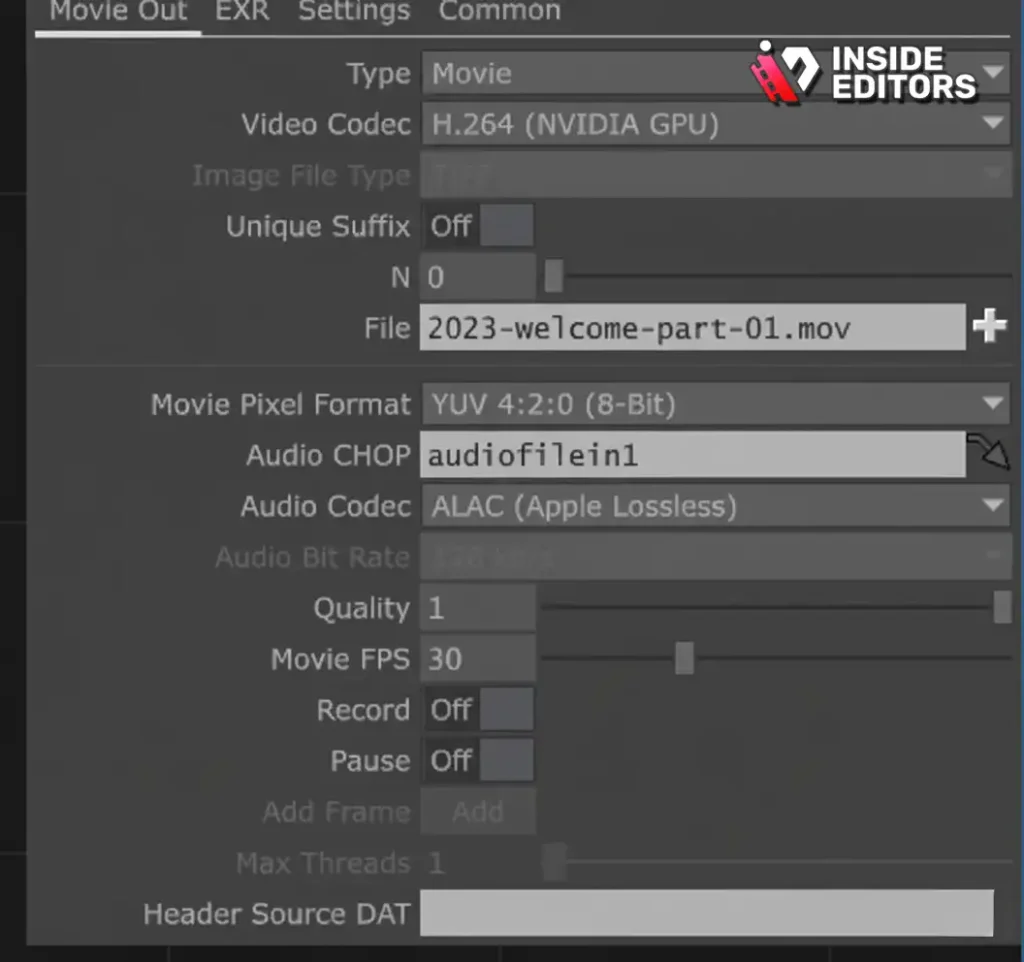
Getting the YouTube Video Dimensions right is only half the battle. You must also ensure your video file is encoded correctly for optimal upload speed and playback quality.
Recommended Encoding Settings
YouTube provides specific recommendations to ensure fast processing and the best possible quality.
| Specification | Recommendation |
| Container | MP4 (Preferred) |
| Video Codec | H.264 |
| Audio Codec | AAC-LC |
| Bitrate | Variable Bitrate (VBR) |
| Frame Rate | Native (24, 30, or 60 FPS) |
Using the H.264 codec within an MP4 container is the industry standard for web video delivery. This combination offers an excellent balance between file size and visual quality.
Bitrate Considerations
Bitrate (measured in kilobits or megabits per second, Mbps) defines the amount of data encoded per second. A higher bitrate generally means better quality but a larger file size. YouTube recommends different bitrates based on resolution and frame rate.
Comparison of Recommended Bitrates (Standard Frame Rate – 24/30 FPS):
| Resolution | Standard Bitrate (Mbps) | HDR Bitrate (Mbps) |
| 4K (2160p) | 35–45 | 44–56 |
| 1440p | 16 | 20 |
| 1080p | 8 | 10 |
| 720p | 5 | 6.5 |
If your editing software allows, setting a target bitrate slightly higher than YouTube’s recommendation (e.g., 10 Mbps for 1080p) can help mitigate quality loss during YouTube’s subsequent compression.
Advanced Dimensions: Live Streams and VR Content
While most creators focus on pre-recorded 16:9 content, specialized formats like live streams and virtual reality videos have unique YouTube Video Dimensions requirements.
Live Streaming Dimensions

Live streams also adhere to the 16:9 aspect ratio, but the technical setup is slightly different.
- Resolution: 1080p (1920×1080) is the most common and reliable live stream resolution.
- Frame Rate: 30 FPS is standard, though 60 FPS is possible for high-motion streams.
- Bitrate: Live stream bitrates are lower than uploaded video bitrates due to the real-time constraints. For 1080p, YouTube recommends 3,000–6,000 Kbps.
Consistency is key in live streaming. Ensure your streaming software (like OBS or Streamlabs) is configured to match the resolution and frame rate settings you select in your YouTube Live Control Room.
360-Degree and VR Video Dimensions

360-degree videos, which allow viewers to look around the scene, require massive resolutions to maintain clarity because the total pixel count is spread across a sphere.
- Aspect Ratio: 2:1 (or very close to it, depending on the camera).
- Recommended Resolution: 4096 x 2048 (4K) or higher. Many professional 360 cameras now shoot in 8K (7680 x 3840).
For 360-degree content, the higher the resolution, the better the final viewing experience, as the effective resolution seen by the viewer at any one moment is much lower than the total file resolution.
Professional Help with YouTube Video Dimensions

Mastering the technical requirements for optimal YouTube Video Dimensions-including aspect ratios, resolutions, codecs, and bitrates-requires time and specialized knowledge. For content creators, marketers, and businesses focused on growth, spending hours troubleshooting rendering settings can be a major drain on resources.
This is where professional support becomes invaluable. Inside Editors offers comprehensive video editing services designed to take the technical burden off your shoulders. Our team of professional editors, with over a decade of experience, ensures every video is rendered using the absolute best YouTube Video Dimensions and encoding settings.
Inside Editors: Your Partner in Video Quality

We understand that quality builds trust. Our services focus on delivering polished, professional results with speed and reliability.
Key Features and Benefits of Partnering with Inside Editors:
- Expert Technical Compliance: We guarantee your videos meet YouTube’s highest standards for resolution (up to 4K), frame rate, and encoding (H.264/MP4).
- Fast Turnaround: We offer rapid delivery, typically within 24 to 72 hours, ensuring you maintain a consistent upload schedule.
- Quality Assurance: Beyond dimensions, we handle professional color grading, audio enhancement, and seamless transitions.
- Affordable and Scalable: Our pricing is designed for creators and businesses, starting affordably with unlimited revisions until you are completely satisfied.
By outsourcing the editing and technical rendering, you save time and can focus entirely on creating compelling content. We ensure your brand style is consistent across all videos, providing a professional quality that resonates with your audience.
If you are struggling with complex export settings, slow rendering times, or simply want to elevate the quality of your channel, consider leveraging the expertise of a professional editing team. We handle the technical complexities of YouTube Video Dimensions so you can focus on creativity.
Final Checklist for Perfect YouTube Video Dimensions

To ensure your next upload is technically flawless, use this quick checklist before hitting the render button:
- Aspect Ratio: Is it 16:9 for horizontal video, or 9:16 for Shorts/Vertical content?
- Resolution: Is the resolution 1080p (1920×1080) minimum, or ideally 4K (3840×2160)?
- Frame Rate: Does the exported frame rate match the source footage (e.g., 30 FPS)?
- Codec: Is the video encoded using H.264?
- Container: Is the file saved as an MP4?
- Bitrate: Is the bitrate set appropriately for the resolution (e.g., 35-45 Mbps for 4K)?
Mastering these technical details is a critical component of professional video production. By adhering to the recommended YouTube Video Dimensions, you eliminate technical barriers and allow your content to shine.
Helpful Resources and Further Reading
For those looking to dive deeper into the technical standards that govern online video, here are some authoritative resources:
- Google’s Official YouTube Help Center: Provides detailed, up-to-date specifications for all upload formats, including specific requirements for HDR and high frame rate content.
- SMPTE Standards: The Society of Motion Picture and Television Engineers (SMPTE) sets the global standards for video, including frame rates and color spaces. Understanding these foundational standards is key to professional production.
- Codec Comparison: A detailed technical analysis of H.264 versus newer codecs like H.265 (HEVC) and AV1, which YouTube is increasingly utilizing for high-efficiency streaming.
Frequently Asked Questions
What is the best aspect ratio for YouTube?
The optimal aspect ratio for standard, horizontal YouTube content is 16:9. This ratio ensures your video fills the screen perfectly on desktop and mobile devices without any black bars, maximizing the viewing experience. Always prioritize 16:9 for traditional YouTube Video Dimensions.
How does 4K resolution improve my videos?
Uploading in 4K (3840×2160) provides YouTube’s compression algorithms with more data. This results in a cleaner, sharper image, even when viewers watch at 1080p. Higher resolution YouTube Video Dimensions also future-proof your content.
What dimensions are required for YouTube Shorts?
YouTube Shorts require a vertical aspect ratio of 9:16. The ideal resolution for these short-form videos is 1080 x 1920 pixels. This ensures the video utilizes the full screen space on mobile devices.
Should I use 30 FPS or 60 FPS?
Use 30 FPS (frames per second) for standard content like vlogs and tutorials. Use 60 FPS for high-action content, such as gaming, sports, or fast-paced motion graphics, to ensure smoother playback and better motion clarity.
What happens if my dimensions are wrong?
If your YouTube Video Dimensions are incorrect (e.g., 4:3), YouTube will add black bars (letterboxing or pillarboxing) to fill the 16:9 player. This looks unprofessional and reduces the perceived quality of your content.


