

Sports video editing is an art form. It’s not just about cutting clips together; it’s about capturing the energy, the tension, and the triumph of the moment. A poorly edited sports highlight reel can feel sluggish, but a dynamic, well-paced sequence can make the viewer feel like they are right back in the stadium. If you’ve ever wondered How To Edit Sports Videos that truly stand out, you’re in the right place. This comprehensive guide will break down the essential techniques, software choices, and creative strategies needed to transform raw footage into compelling, high-impact content.
This process requires technical skill, a keen sense of rhythm, and an understanding of the narrative arc inherent in athletic competition. Whether you are creating content for social media, a highlight reel for an athlete, or a documentary, mastering the fundamentals of dynamic editing is crucial. By the end of this guide, you will have a clear roadmap for tackling even the most chaotic game footage and turning it into polished, engaging video.
The Foundation: Understanding Dynamic Sports Narrative

Before you even open your editing software, you must understand the core purpose of the video. Sports editing is fundamentally storytelling. You are taking moments of action and weaving them into a cohesive narrative that emphasizes drama and excitement.
Defining Your Audience and Goal
Every edit should serve a specific goal. Are you aiming to create a fast-paced hype video for a social media campaign, or a detailed analysis of a game-winning play? The target audience-be it casual fans, coaches, or recruiters-will dictate the pace, music choice, and graphic style. Knowing this context is the first step in learning How To Edit Sports Videos effectively. If you are creating content for a professional team, the style needs to be consistent with their brand guidelines.
“The goal of sports editing is not just to show what happened, but to make the viewer feel the adrenaline of the athlete.” – J.R. Smith, Veteran Sports Editor
Pre-Production and Footage Management
Effective editing starts with organization. Sports footage often involves multiple cameras, varying frame rates, and hours of material. Before cutting, you must sync your clips, label them clearly (e.g., “Goal_Cam1,” “DefensiveStop_SlowMo”), and create proxies for smoother playback if you are working with high-resolution 4K or 8K files. A well-organized project file saves countless hours down the line. This meticulous preparation is vital for anyone learning How To Edit Sports Videos efficiently.
Choosing the Right Tools for the Job
The software you choose significantly impacts your workflow. While the core editing principles remain the same, different programs offer unique advantages, especially concerning motion graphics and color grading capabilities.
| Feature | Adobe Premiere Pro | DaVinci Resolve | Final Cut Pro X |
|---|---|---|---|
| Industry Standard | Yes (High compatibility) | Growing rapidly | Yes (Mac ecosystem) |
| Color Grading | Excellent (via Lumetri) | Industry-leading (Fusion page) | Strong |
| Motion Graphics | Strong (via After Effects link) | Growing (Fusion page) | Good (Built-in tools) |
| Cost | Subscription Model | Free/Paid Studio Version | One-time Purchase |
| Best For | Professional workflows, integration | Color-centric projects, high-end post | Mac users prioritizing speed |
Regardless of the tool, familiarity with keyboard shortcuts is non-negotiable for achieving the speed required in dynamic sports editing.
Mastering the Dynamic Cut: Pacing and Rhythm
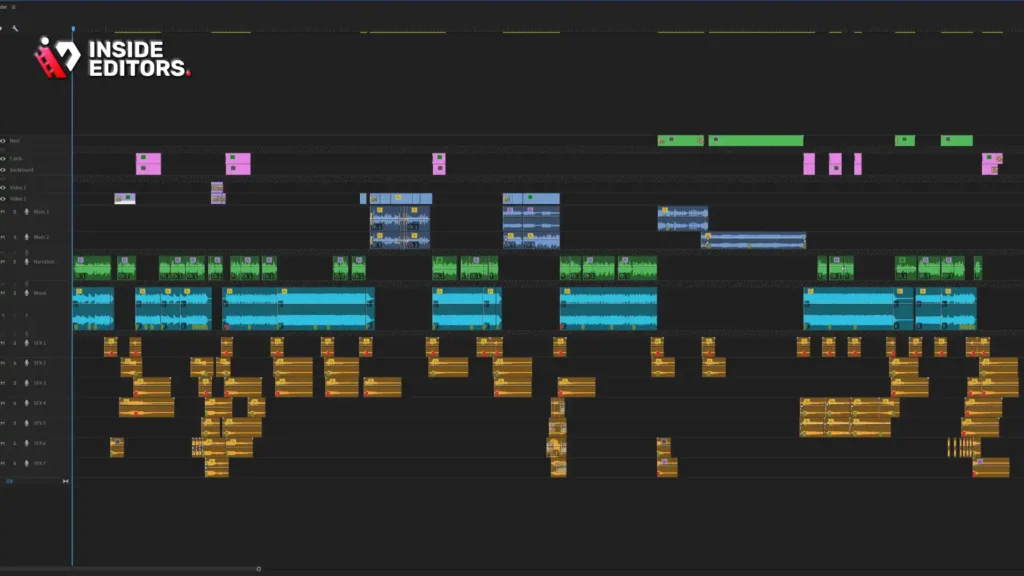
The difference between amateur and professional video editing often comes down to pacing. Dynamic cuts are all about rhythm-matching the visual action to the emotional beat of the music or the sound design.
Cutting on Action (The Golden Rule)
The most fundamental rule in dynamic editing is cutting on the action, not before or after it. When an athlete jumps, kicks, or throws, the cut should happen precisely at the moment of peak movement. This technique masks the transition, making the sequence feel seamless and energetic. If you want to learn How To Edit Sports Videos that feel fast and professional, focus intensely on this timing.
The Power of Slow Motion and Speed Ramping
Slow motion is a powerful tool for emphasizing impact and drama. However, overuse dilutes its effect. Use slow motion strategically:
- Impact: Immediately after a goal, a dunk, or a hard tackle.
- Anticipation: Briefly slowing down just before the critical moment.
Speed ramping-smoothly transitioning from normal speed to slow motion and back-is essential for modern sports reels. It allows you to maintain the overall pace while highlighting key details. Ensure your original footage was shot at a high frame rate (60fps, 120fps, or higher) to achieve smooth, artifact-free slow motion.
Audio Synchronization and Music Selection
Music is the engine of a sports video. The rhythm of the track dictates the rhythm of your cuts.
- Identify Beats: Mark the major percussion points and bass drops in your music track.
- Match Cuts: Align your most impactful visual cuts (goals, celebrations) directly with these musical beats.
- Build Tension: Use music that starts subtly and builds intensity, culminating in a drop coinciding with the climax of the action.
The sound design, including cheers, grunts, and the sound of the ball, should be layered underneath the music to add authenticity. This meticulous attention to auditory detail is key to understanding How To Edit Sports Videos that truly resonate.
Advanced Techniques for Visual Impact
Once you’ve mastered basic timing and pacing, you can integrate advanced visual techniques that elevate the production quality and make your sports videos look cinematic.
Color Grading for Mood and Intensity
Color grading sets the tone. Sports footage often benefits from slightly saturated colors, high contrast, and deep blacks to enhance the drama.
- Cool Tones: Often used for intense, gritty moments or defensive plays.
- Warm Tones: Ideal for celebrations, sunlit outdoor shots, or moments of triumph.
Consistency is paramount. All clips within a sequence must share a similar color profile to maintain visual continuity. Using LUTs (Look-Up Tables) can provide a fast starting point, but always fine-tune them to match the specific lighting conditions of your footage.
Utilizing Motion Graphics and Text Overlays
Motion graphics-like lower thirds, score overlays, and animated statistics-add professionalism and context.
- Kinetic Typography: Use animated text to highlight key phrases or stats, syncing the text movement with the music.
- Tracked Graphics: For advanced editors, tracking graphics onto moving objects (like jerseys or balls) can provide dynamic visual information.
Keep graphics clean and readable. In fast-paced sports videos, the viewer only has a fraction of a second to absorb information. Simplicity and impact should be the priority.
Camera Shake and Impact Effects
To emphasize a powerful moment, editors often simulate camera shake or use subtle impact effects. This is usually done by applying a slight, quick position or rotation keyframe adjustment right at the moment of impact (e.g., a hard hit or a slam dunk). This small technique dramatically increases the perceived force of the action. However, like slow motion, use this sparingly to avoid viewer fatigue.
Common Pitfalls and Expert Troubleshooting

Even experienced video editors run into challenges when dealing with the unpredictable nature of sports footage. Knowing how to anticipate and fix these issues is crucial for anyone trying to master How To Edit Sports Videos.
Dealing with Shaky Footage
Footage shot handheld or on the run can often be too shaky to use. Most modern editing suites include powerful stabilization tools (Warp Stabilizer in Premiere Pro, for instance).
- Stabilization Tips: Apply stabilization only to the necessary clips. Always render and check the stabilized footage, as aggressive stabilization can introduce warping artifacts. If the footage is too shaky, it may be better to use it only for very short, quick cuts where the movement is less noticeable.
Maintaining Continuity Across Multiple Angles
When cutting between multiple camera angles of the same action, ensure the spatial and temporal continuity is maintained. If a player is moving left to right in one shot, they should generally continue moving left to right in the next. Breaking the “180-degree rule” can disorient the viewer, making the action confusing.
Avoiding Copyright Issues
Music selection is critical, but using copyrighted tracks without permission can lead to videos being taken down or demonetized. Always use licensed stock music or tracks from royalty-free libraries. If you are producing content professionally, securing the correct usage rights is non-negotiable.
“Copyright compliance is not a suggestion; it’s a necessity for professional content creators. Invest in good stock music libraries.” – Sarah Chen, Media Licensing Consultant
The Professional Edge: When to Outsource Your Sports Editing

While learning How To Edit Sports Videos yourself offers creative control, there are times-especially when deadlines are tight or the volume of content is overwhelming-when partnering with professional video editing services is the smarter, more scalable choice.
Why Choose Professional Video Editing Services?
For businesses, marketing teams, or high-volume content creators, outsourcing ensures consistent quality and fast delivery. Inside Editors provides professional video editing services specifically tailored for dynamic content, including sports.
Inside Editors Service Details: Our professional editing team has over a decade of experience transforming raw footage into polished, high-impact videos. We understand the nuances of dynamic sports editing, from precise cutting on action to advanced color grading and sound design.
Key Features and Benefits:
- Expertise: Our editors are specialists in dynamic content, ensuring your sports videos are engaging and professional.
- Fast Turnaround: We offer rapid delivery, typically within 24-72 hours, allowing you to meet tight game-day deadlines.
- Quality Assurance: We include color grading and audio enhancement as standard, ensuring every video looks and sounds incredible.
- Affordable and Scalable: With affordable pricing starting at just $29 per video, we offer a scalable solution perfect for growing channels and consistent content needs.
- Unlimited Revisions: We work with you until you are 100% satisfied, guaranteeing the final product perfectly aligns with your vision.
By utilizing a service like Inside Editors, you save valuable time, allowing you to focus on capturing more great footage or managing your content strategy. We ensure a consistent brand style across all your videos, building trust and professionalism with your audience.
The Workflow of Outsourcing
When you choose a professional service, the workflow is designed for efficiency:
- Upload Footage: You securely upload your raw sports clips and provide your creative brief (music, desired tone, key moments).
- Professional Editing: Our team handles the organization, dynamic cutting, color correction, and audio mixing.
- Review and Revisions: You receive the draft, provide feedback, and we implement unlimited revisions until the video is perfect.
- Final Delivery: You receive the high-resolution, ready-to-publish file quickly.
This streamlined process makes it easy to maintain a high volume of professional-grade content without sacrificing quality.
Advanced Storytelling and Sequence Structure
A great sports video is more than just a collection of highlights; it has a structure that builds emotional investment. Understanding this structure is the final piece of the puzzle in learning How To Edit Sports Videos.
The Three-Act Structure of a Highlight Reel
Even a 60-second highlight reel benefits from a classic narrative structure:
- The Hook (Act I): Start with the single most impactful, exciting moment-the climax. This grabs the viewer immediately. Use quick cuts and high energy.
- The Build-Up (Act II): Slow the pace slightly. Show the effort, the training, the defensive stops, and the near misses. This builds tension and shows the journey. Use medium-paced cuts and B-roll footage.
- The Payoff (Act III): Return to the high energy. Show a sequence of successful plays, culminating in a final, powerful celebration shot. The music should drop here, and the cuts should be rapid and perfectly synced to the beat.
Using Contrast to Maximize Impact
Contrast is your friend. Juxtapose slow, deliberate shots (a player staring down an opponent) with explosive, fast action (the resulting play). Contrast the quiet focus of the locker room with the deafening roar of the crowd. This dynamic range keeps the viewer engaged and amplifies the emotional peaks.
Incorporating Interviews and Context
For longer-form content, such as athlete profiles or season recaps, seamlessly integrating interview clips provides necessary context and emotional depth.
- B-Roll Under Interviews: When an athlete is speaking, cut away from their face to show relevant B-roll footage of them performing the action they are describing. This reinforces their narrative and keeps the visuals interesting.
Checklist for a High-Impact Sports Video
Before exporting your final cut, run through this checklist to ensure you’ve maximized the impact of your dynamic editing. This is the ultimate test of How To Edit Sports Videos successfully.
- Pacing: Are the cuts matched to the music’s rhythm? Is the pace varied (slow/fast/slow)?
- Action Timing: Are all cuts happening precisely on the moment of peak action?
- Visual Clarity: Is the footage stabilized and color-graded consistently?
- Audio Mix: Is the music volume appropriate? Are sound effects layered effectively?
- Narrative Flow: Does the video have a clear beginning, middle, and end that builds to an emotional climax?
- Resolution: Is the final export resolution and frame rate correct for the intended platform (e.g., 9:16 for Tiktok Video Editing, 16:9 for YouTube)?
“A great editor knows when to hold a shot and when to cut. In sports, you almost always cut faster than you think you should.” – Casey Neistat, Filmmaker and Content Creator
Mastering How To Edit Sports Videos is an ongoing process of refinement, practice, and keeping up with evolving visual trends. By focusing on dynamic cuts, strategic pacing, and powerful sound design, you can produce content that captures the raw energy of competition and leaves a lasting impression on your audience.
If the technical demands of high-volume, professional sports editing are pulling you away from your core creative work, remember that scalable, expert support is available. Inside Editors specializes in providing fast, professional, and reliable video editing services, ensuring your content always meets the highest standards of quality and impact. Focus on creating the moments; we’ll handle making them unforgettable.
FAQ
What is the best software for sports editing?
The best software depends on your ecosystem, but Adobe Premiere Pro and DaVinci Resolve are industry standards. Premiere Pro offers great integration, while Resolve excels in color grading. Both allow you to learn effective techniques for How To Edit Sports Videos dynamically.
How fast should cuts be in a highlight reel?
In a dynamic highlight reel, cuts should be very fast-often less than one second-and perfectly synchronized with the music’s beat or the moment of peak action. Slower cuts are reserved for building tension or showing celebration after the main action.
Should I use slow motion frequently?
No, use slow motion strategically to emphasize impact or drama. Overusing slow motion can slow down the overall pace. When learning How To Edit Sports Videos, reserve slow motion for the most critical, high-impact moments only.
How do I avoid shaky footage issues?
Always shoot at a high frame rate if possible. In post-production, use the built-in stabilization tools in your editing software, but apply them gently. Too much stabilization can introduce unwanted visual warping artifacts.
What makes a sports video look professional?
Professional sports videos feature precise cuts on action, consistent color grading, high-quality audio mixing, and a clear narrative structure. Mastering How To Edit Sports Videos requires attention to both the visual rhythm and the emotional impact.


