


In the fast-paced world of short-form video content, creativity is the ultimate currency. One of the most captivating effects you can use to instantly hook your audience is the video reversal effect. This simple technique can turn ordinary footage into something magical, making water flow uphill or objects fly back into your hand. If you’ve been wondering how to reverse a video on tiktok directly within the app, or if you need more professional methods, you’re in the right place.
“The magic of short-form video often lies in the unexpected. Reversing footage breaks the viewer’s expectation and forces them to re-engage with the content.” – Sarah Chen, Digital Content Strategist
How to reverse video on TikTok Simply
Here is how to put a video in reverse on TikTok:
Step 1
- Install the TikTok app
Begin by downloading the TikTok app from your phone’s App Store or Google Play Store. Open the app and log in to start creating content.
STEP 2
- Record or upload a video
Once in the app, tap “+” to record or select a video, then click “Check” to edit. This is the first step to reverse a video on TikTok.
STEP 3
- Open the effects menu
Now press the “Effects” button in the bottom-right corner to access TikTok’s video editing options, including the reverse feature.
STEP 4
- Apply the reverse effect
In the Effects menu, go to the “Time” tab and choose “Reverse” to automatically reverse your video clip and make the actions appear backward.
STEP 5
- Post and share
Once satisfied, hit the “Post” button to upload the video to your profile. You can now share your reversed video with your followers or further edit it by adding music, text, or other effects. now share your reversed video with your followers or further edit it by adding music, text, or other effects.
3 Simple Way to Reverse Videos for TikTok
This comprehensive guide, brought to you by the experts at Inside Editors, will walk you through three distinct ways to achieve this popular effect. We will cover the native TikTok method, external app solutions, and professional post-production techniques. Mastering how to reverse a video on tiktok is a fundamental skill for any serious content creator looking to elevate their production quality and stand out in the crowded feed.
Method 1: Using the Built-In TikTok Reverse Effect
The easiest and quickest way to learn how to reverse a video on tiktok is by utilizing the platform’s native effects library. TikTok designed this tool for speed and accessibility, allowing creators to apply the effect immediately after recording or uploading their clip.
Step-by-Step Guide to Applying the Native Reverse Effect
The process is straightforward, but it requires you to know exactly where the effect is hidden within the editing suite. You must first record or upload your video clip before accessing the effects menu.
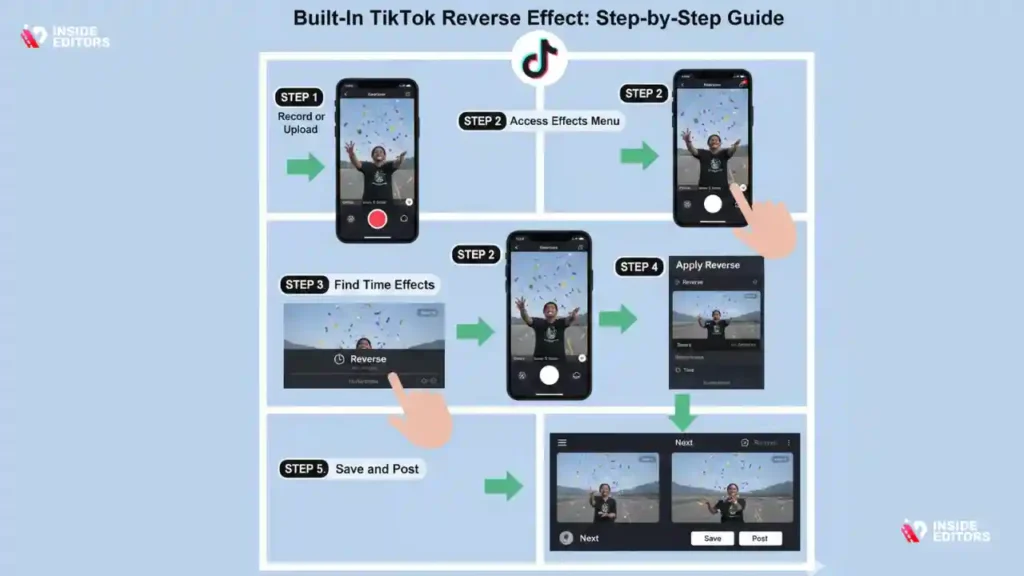
- Record or Upload: Open the TikTok app and tap the “+” icon to start a new video. Record your content or upload a video from your device’s gallery. Once satisfied, tap the checkmark to move to the editing screen.
- Access the Effects Menu: On the editing screen (where you add text, sounds, and stickers), look for the “Effects” button, usually located on the bottom toolbar. Tap this to open the effects browser.
- Find the Time Effects: Within the effects browser, you will see several categories. Swipe through the categories until you find “Time” or “Time Effects.” This category houses speed adjustments and the reverse function.
- Apply Reverse: Tap the “Reverse” effect icon. TikTok will immediately process your video, showing you a preview of the reversed footage. The processing time depends on the length of your clip.
- Save and Post: If the reversed video looks correct, tap “Save” (usually in the top right corner) to apply the effect permanently to your draft. You can now proceed to add music, captions, and hashtags before posting.
Limitations of the Native TikTok Reverse Tool
While convenient, the built-in TikTok reverse tool has limitations that professional creators should be aware of. It applies the effect to the entire clip, meaning you cannot selectively reverse only a small segment of the video. Furthermore, the tool sometimes reduces the overall video quality slightly during the processing phase.
For creators focused on high-fidelity visual storytelling, understanding these limitations is crucial. If you need precise control over timing or wish to maintain the highest resolution, you might need to explore external editing applications. This is a key consideration when deciding how to reverse a video on tiktok effectively.
Method 2: Use Third-Party Editing Apps for Precision
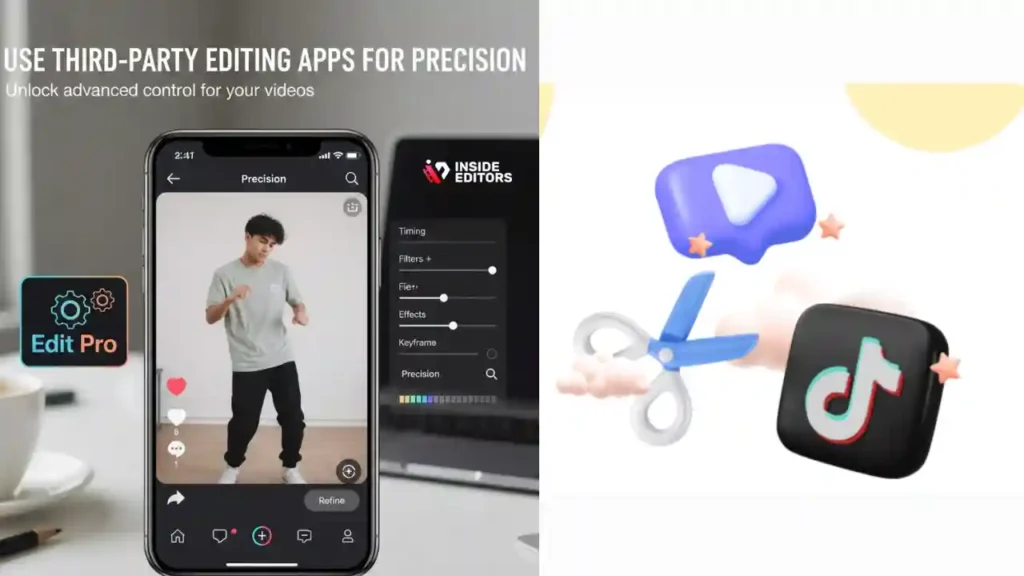
For advanced creators who require more control, third-party mobile editing applications offer superior flexibility and customization when reversing video clips. These apps allow for frame-accurate adjustments, making it possible to reverse only a specific action within a longer sequence.
Why Use External Apps for Reversing?
External apps like CapCut (often recommended for TikTok editing), InShot, or VN Editor provide a full timeline editing experience. This means you can split your video, apply the reverse effect only to the isolated segment, and then seamlessly stitch the clips back together. This level of precision is essential for complex visual effects or narrative storytelling.
| Feature | TikTok Native Tool | Third-Party App (e.g., CapCut) |
|---|---|---|
| Control | Applies to the entire clip only. | Segment-specific reversal possible. |
| Quality | May slightly reduce resolution. | Maintains original resolution (or higher). |
| Editing Suite | Limited effects and timeline. | Full professional timeline, layers, and keyframes. |
| Ease of Use | Very simple, one-tap solution. | Requires basic timeline editing knowledge. |
The Process of Using a Dedicated App
To learn how to reverse a video on tiktok using a third-party app, you must first export the final reversed video from the app and then upload it to TikTok.
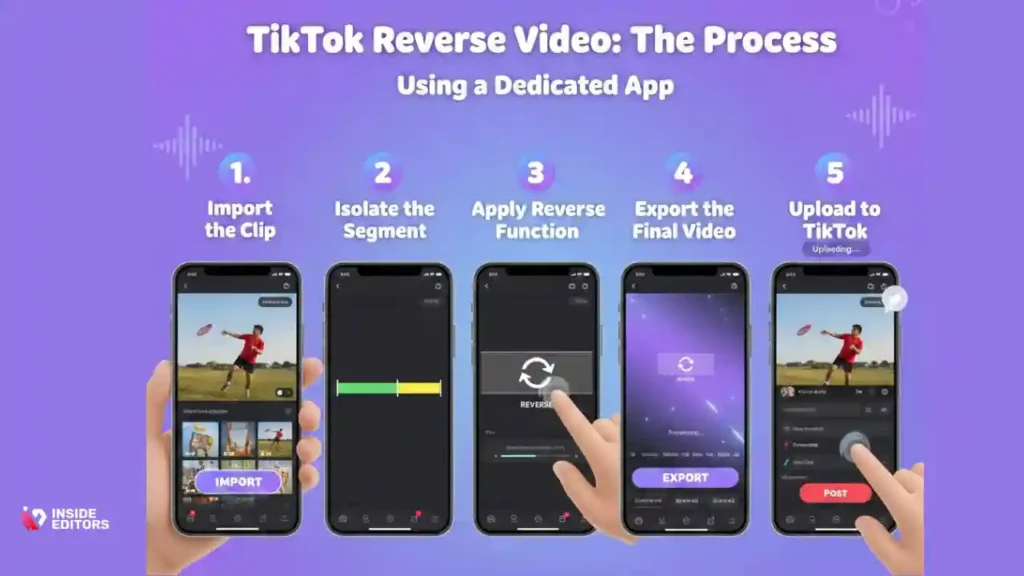
- Import the Clip: Open your chosen editing app and start a new project, importing the video you wish to reverse.
- Isolate the Segment: If you only want to reverse a portion, use the Split or Cut tool to isolate the specific segment. Delete the original segment, leaving the isolated piece on the timeline.
- Apply the Reverse Function: Most reputable editing apps have a dedicated Reverse button, usually found in the toolbar when the clip is selected. Tap this, and the app will render the reversed footage.
- Export the Final Video: Once satisfied, export the video in a high-resolution format (like 1080p or 4K).
- Upload to TikTok: Open TikTok, select the upload option, and choose the newly exported, reversed video from your gallery.
This method ensures maximum quality and creative freedom, allowing you to create high-impact content that truly stands out.
“High-quality editing tools democratize cinematic effects. Reversing a video with precision can elevate a simple clip into viral content.” – Dr. Michael Lee, Media Technology Researcher
Method 3: Pro Post-Production for Advanced Reversal
For brands, businesses, or content creators who demand flawless execution and integrated branding, relying on professional desktop software or expert editing services is the best approach. This method guarantees the highest quality, seamless transitions, and the ability to integrate complex effects alongside the reversal.
When to Seek Professional Assistance
While the mobile methods are excellent for casual use, professional post-production becomes necessary when:
- The video is part of a larger marketing campaign requiring brand consistency.
- The reversal needs to be combined with complex motion graphics, color grading, or sound design.
- The source footage is high-resolution (4K or higher) and requires powerful software to process without quality loss.
- Time is a critical factor, and you need a fast, guaranteed turnaround.
Leveraging Professional Video Editing Services
If the process of learning how to reverse a video on tiktok perfectly, alongside managing all other editing demands, feels overwhelming, consider partnering with experts. Inside Editors specializes in professional video editing services designed for content creators, marketers, and businesses.
Our professional editing team, with over 10 years of experience, can handle everything from simple reversals to complex multi-layered edits. We understand the nuances of TikTok’s aspect ratios and quality requirements. We offer fast turnaround times, typically between 24 and 72 hours, and provide unlimited revisions until you are completely satisfied. This affordable solution, starting at $29 per video, includes crucial elements like color grading and audio enhancement, ensuring your reversed clip looks polished and professional.
Advantages of Professional Editing for TikTok
Choosing a professional service like Inside Editors ensures that your content is not only reversed correctly but also optimized for maximum engagement.
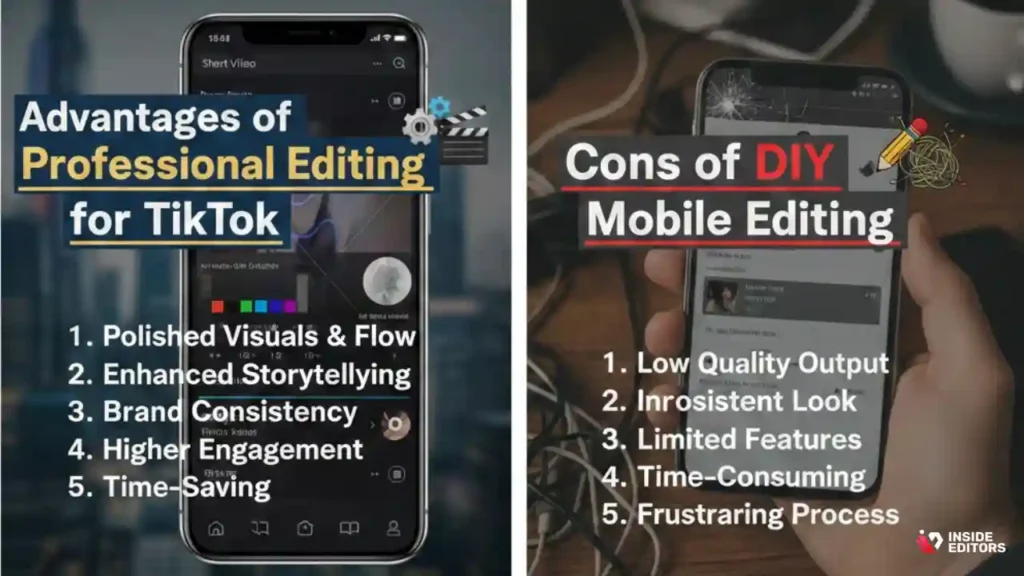
Pros of Professional Editing:
- Guaranteed Quality: Flawless execution, maintaining 4K resolution and high frame rates.
- Time Savings: You save valuable time, allowing you to focus entirely on content creation and strategy.
- Consistency: Ensures a consistent brand style across all your videos, building audience trust.
- Comprehensive Enhancement: Includes professional color grading, audio cleanup, and graphic integration.
Cons of DIY Mobile Editing:
- Steep Learning Curve: Mastering advanced mobile apps takes time and practice.
- Quality Risk: Errors in exporting or uploading can lead to noticeable quality degradation.
- Limited Scope: Mobile apps cannot handle highly complex graphic overlays or detailed sound mixing.
“In the professional sphere, video quality is non-negotiable. Outsourcing complex edits like precision reversal ensures the final product reflects the brand’s commitment to excellence.” – Alex Rodriguez, CEO of a global marketing firm
Mastering the Nuance of Video Reversal Effects
Understanding how to reverse a video on tiktok is just the first step; mastering when and why to use it defines a truly effective creator. The reversal effect is a powerful visual tool that plays on physics and logic, making it ideal for certain types of content.
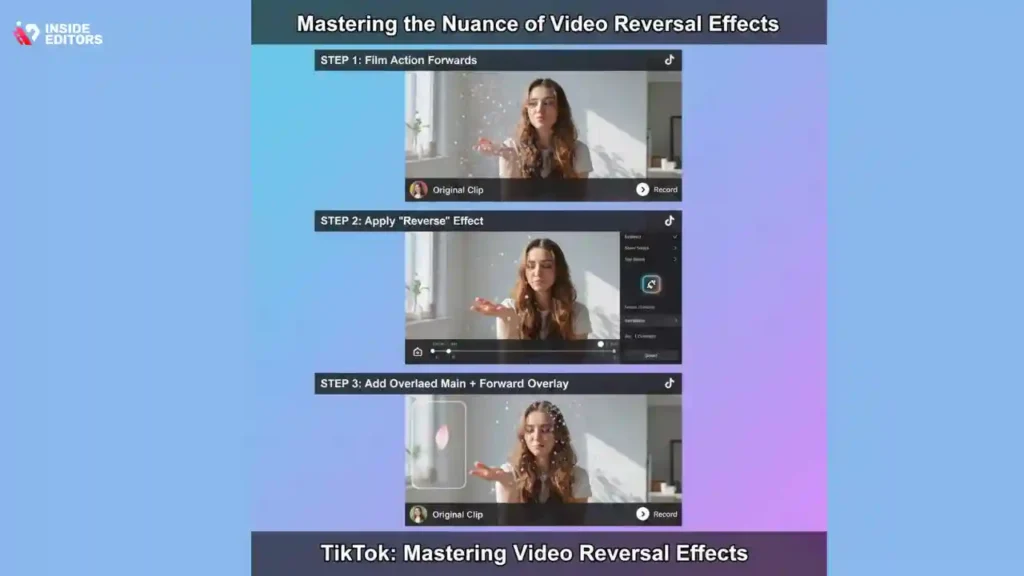
Creative Applications for Reversed Footage
Think beyond simple stunts. Reversed footage can enhance several content niches:
- Product Demonstrations: Show a product being “un-assembled” or ingredients “un-mixing.” This creates curiosity and highlights the components.
- Magic and Illusions: The classic reversal effect is key to making objects appear to fly back to your hand or clothes instantly change.
- Art and Creation: Show a painting or sculpture magically “un-creating” itself, emphasizing the final result by showing the process in reverse.
- Sports and Action: A reversed dive back onto the board or a basketball flying out of the hoop and into the player’s hands creates a dynamic, eye-catching loop.
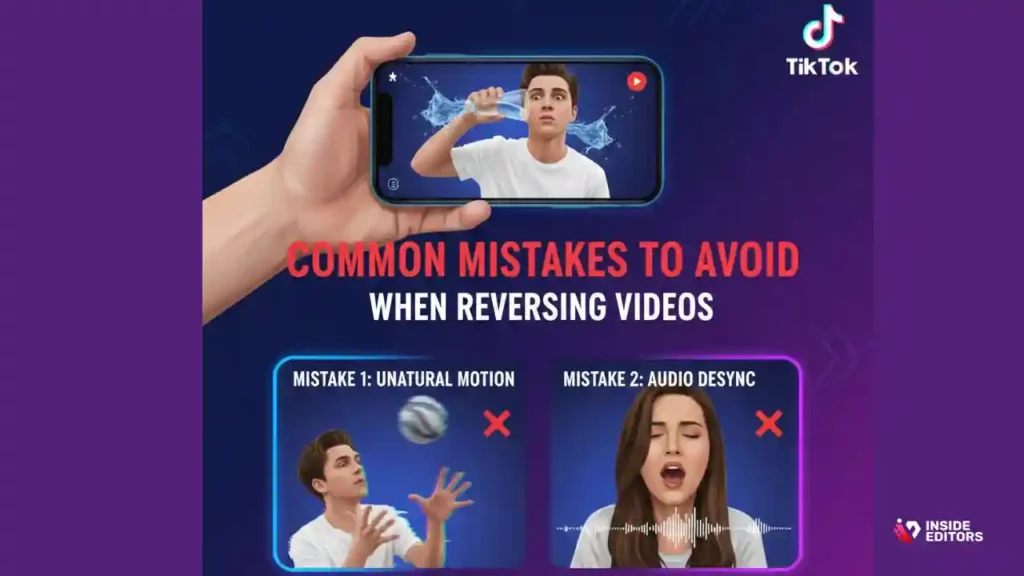
Common Mistakes to Avoid When Reversing Videos
Even after learning how to reverse a video on tiktok, creators often make small errors that undermine the effect:
- Visible Sound Cues: When reversing video, the audio is also reversed, which often sounds unnatural or distorted. Always mute the original audio track and replace it with music or a voiceover after the reversal is complete.
- Unnatural Physics: Ensure the reversed action looks plausible. If the reversed motion is too jerky or clearly violates basic gravity (in a non-magical context), the illusion is broken.
- Poor Transitions: If you reverse only a segment, the transition back to normal speed must be smooth. Use a professional editing tool to feather the cut or use a quick visual cue to mask the transition.
Conclusion: Elevating Your TikTok Content
Whether you choose the quick, native TikTok tool or opt for the precision of external apps, mastering how to reverse a video on tiktok opens up a new dimension of creative possibilities. This effect is a proven way to increase watch time and engagement by offering viewers a unique visual experience.
For creators who prioritize speed, quality, and professional polish, remember that Inside Editors is here to support your content goals. Our professional video editing services ensure that complex effects, including precision video reversal, color grading, and audio enhancement, are handled by experts. By partnering with us, you gain access to a professional editing team with a 10+ year track record, fast turnaround, and affordable pricing, allowing you to focus on what you do best: creating compelling content.
If you are serious about scaling your presence and need professional quality that builds trust, explore our services today. We make the technical side of content creation seamless, ensuring every video, including those requiring the complex effect of how to reverse a video on tiktok, meets the highest standards.
Frequently Asked Questions
Can I reverse only part of a TikTok video?
The native TikTok tool applies the reverse effect to the entire clip. To reverse only a segment, you must use a third-party video editing app like CapCut. This allows you to split the video, reverse the isolated piece, and maintain control over how to reverse a video on tiktok precisely.
Does reversing a video reduce quality?
The native TikTok effect may cause a slight quality reduction during processing. Using professional editing software or services ensures that the original high-resolution quality is maintained, even when learning how to reverse a video on tiktok.
How do I fix reversed audio?
When you reverse a video, the audio is reversed too, often sounding distorted. The best practice is to mute the original audio track after applying the reverse effect and then add new, royalty-free music or a voiceover.
Is the reverse effect free on TikTok?
Yes, the built-in Reverse effect is a free feature available within the TikTok editing suite under the ‘Time Effects’ category. No extra payment or subscription is required to use this basic tool.
What is the best app for precise reversal?
Apps like CapCut, InShot, or VN Editor are highly recommended for precise video reversal. They offer timeline editing, letting you select and reverse specific segments of your footage before uploading to TikTok.
Why should I use the reverse effect?
The reverse effect is highly engaging because it creates visual surprise, making objects or actions defy gravity or logic. It’s excellent for magic tricks, product reveals, and generating higher viewer retention.
Can I reverse a pre-recorded video?
Yes, you can reverse any video, whether it was recorded directly in the TikTok app or uploaded from your phone’s gallery. The process for how to reverse a video on tiktok remains the same.
How long does professional reversal take?
Professional video editing services, such as those offered by Inside Editors, typically provide a fast turnaround time of 24 to 72 hours for videos requiring effects like precision reversal.


